Network routes
A VM whose network is Routed (route per run) lets you choose, for each run, where the sample’s traffic goes: nowhere, to fake services, straight to the Internet, through Tor, through a WireGuard tunnel or through a SOCKS5 proxy. Between runs a Routed VM has a working network card and an address, but nothing leaves.
Everything runs as your own user: no root, no firewall rules, no TUN device and no VPN client installed on the computer. The guest is not changed either; the routing happens in Antinomie’s own gateway on the host. Network routes arrived in Antinomie 0.7.1; the fake cloud metadata service on Routed VMs is New in 0.8.0.
How a Routed VM is wired
Section titled “How a Routed VM is wired”| VM network | What the guest gets | Route |
|---|---|---|
| Disconnected (default) | No network card | Fixed: none |
| Isolated | QEMU user networking with restrict=on: an address, nothing forwarded |
Fixed: nothing leaves the VM |
| NAT (Internet) | QEMU user networking without restrictions | Fixed: the host’s network and the Internet |
| Routed (route per run) | A card wired to Antinomie’s gateway | Chosen per run |
On a Routed VM, QEMU connects the guest’s network card to a local socket owned by the Antinomie app. The thread behind it is the guest’s router, DHCP server and DNS server, and it carries the guest’s connections itself. What it does with them is the current run’s route. The gateway starts on None (drop) and returns to it when a run ends.
Set the network in the VM dialog under Network and telemetry → Network;
the dialog then says Routed: each run picks a route (Settings > Network routes). The change applies at the next boot. A Routed VM needs QEMU 7.2 or
newer (its stream network backend); with an older QEMU the VM does not start,
and it never falls back to a NAT it was not set to.
The guest’s addresses come from the VM’s stealth profile: QEMU’s 10.0.2.0/24 for the Transparent preset, 192.168.1.0/24 for the realistic presets, and the provider’s network for a Cloud VPS profile.
The routes
Section titled “The routes”| Route | What the sample can do | Leaves this computer | Names resolved by |
|---|---|---|---|
| None (drop) | Nothing leaves. Connections and DNS go unanswered; the attempts are still captured. | No | Nobody (no answer) |
| Internet | Connect to public addresses through this computer’s connection; never this computer or your local network unless you allow private addresses. | Yes | This computer |
| InetSim (fake services) | Every name resolves to a fake address and every connection reaches a fake service. | No | The gateway (fake answers) |
| Tor | Connect through Tor, which Antinomie starts for the run, or through a Tor you run. | Yes, from a Tor exit | Tor |
| VPN (WireGuard) | Connect through a WireGuard tunnel run by wireproxy, in userspace. | Yes, from the VPN’s exit | Through the tunnel |
| SOCKS5 proxy | Connect through a SOCKS5 proxy you give. | Yes, from the proxy | The proxy |
None (drop)
Section titled “None (drop)”The guest has a link and an address, but the gateway answers no connection and no DNS query. Use it to see what a sample tries to reach without letting it reach anything: the capture shows every attempt. It is the default route unless you change it.
Internet
Section titled “Internet”The host connects for the guest, directly, and resolves DNS itself. The gateway
refuses loopback, link-local, multicast and other special addresses, and
private addresses (RFC 1918 and 100.64.0.0/10) unless Allow private network
addresses is ticked in Settings › Network routes. With it off, the
Internet route reaches public addresses only, never this computer or your local
network. The Run form warns Internet: the sample can reach the real Internet from this computer.
InetSim (fake services)
Section titled “InetSim (fake services)”Every DNS name resolves to one fake address, 198.51.100.1 by default
(DNS answers), which is never connected to. Every connection to it reaches
a fake service instead. Nothing leaves the host. Services chooses who
answers:
- Built-in (DNS, HTTP, SMTP; other ports accept and discard): Antinomie’s
own small responder. HTTP on ports 80 and 8080 answers
200 OKwith a default page (and a content type that fits the requested file name), SMTP on ports 25 and 587 accepts and queues mail, and any other port accepts the connection and discards what the guest sends. Each connection is served on its own thread over an in-process socket pair, so nothing listens on the host. There is no TLS: HTTPS needs INetSim. - A running INetSim of yours: Antinomie sends each connection to INetSim
at INetSim host (
127.0.0.1by default). Because you run INetSim as yourself, it must listen on high ports: a guest connection to port P goes to P plus the Port offset (10000 by default). Antinomie answers DNS itself, so INetSim’s DNS service is not used. The page shows whether aninetsimprogram is found onPATH.
For the default offset, inetsim.conf would hold, for example:
service_bind_address 127.0.0.1http_bind_port 10080https_bind_port 10443smtp_bind_port 10025ftp_bind_port 10021start_service httpstart_service httpsstart_service smtpstart_service ftpEvery connection goes through Tor, and Tor resolves the names. Tor has two modes:
- Antinomie runs its own tor for each run (the default). Antinomie starts
torwhen the run claims the route, on a free port of127.0.0.1, with a private data folder under its data folder (network/tor, readable by you only) and no control port, and stops it when the run ends. The run waits for Tor to finish bootstrapping (up to two minutes) and does not start if it cannot. A first start is slower than later ones, which reuse the folder. tor program names atorto use; empty usesPATH, then the copy Antinomie installed. - Use a SOCKS address (a Tor you already run): connect to a Tor you run
yourself (a
torservice listens on127.0.0.1:9050). Antinomie starts nothing.
Check target (check.torproject.org:443 by default) is connected through
Tor before a run starts, to prove the circuit works; empty checks only that Tor
answers.
VPN (WireGuard)
Section titled “VPN (WireGuard)”Every connection goes through a WireGuard tunnel run by wireproxy, a userspace WireGuard client with a SOCKS5 port, so no root is needed. Names are resolved through the tunnel.
- Configuration file: a wireproxy configuration with your WireGuard peer
and a
[Socks5]section withBindAddress = 127.0.0.1:25344. Antinomie starts wireproxy with it for each run and stops it afterwards. - wireproxy: the program to use; empty uses
PATH, then the copy Antinomie installed. - Check target: a
host:portconnected through the tunnel before a run; empty skips the check. - OpenVPN: not supported. It needs a TUN device, which needs root. Run it yourself (for example in a container) with a SOCKS5 front end and use the SOCKS5 route.
SOCKS5 proxy
Section titled “SOCKS5 proxy”Every connection goes through the SOCKS5 proxy at Host and Port (1080
by default), with an optional User name and Password; the proxy
resolves the names. The password is saved in your data folder, readable by you
only, and never shown, logged, put in run records or exported. Check target
(1.1.1.1:443 by default) is connected through the proxy before a run; empty
checks only the proxy login.
Getting tor and wireproxy
Section titled “Getting tor and wireproxy”You do not have to install them. A program you name in Settings is used first,
then one on PATH or in the usual system places, then the copy Antinomie
installed. Under the Tor and VPN settings the page shows each program’s status
(on this system, installed by Antinomie with its version, or not installed) and
an Install button. Install downloads the pinned release (wireproxy 1.1.3
from GitHub; the Tor Expert Bundle 15.0.26, which holds tor 0.4.9.14, from
archive.torproject.org), checks its SHA-256 and unpacks it into your data
folder. Remove deletes Antinomie’s copy. Downloads need curl; nothing is
downloaded until you press Install. A full pack you build for an offline
computer carries both.
Settings › Network routes
Section titled “Settings › Network routes”Tools → Settings → Network routes holds the default route and every
route’s settings. The page says Used by VMs set to Routed; chosen per run.
Save routes stores them in network/routes.json in the data folder,
readable by you only; Revert drops unsaved changes.
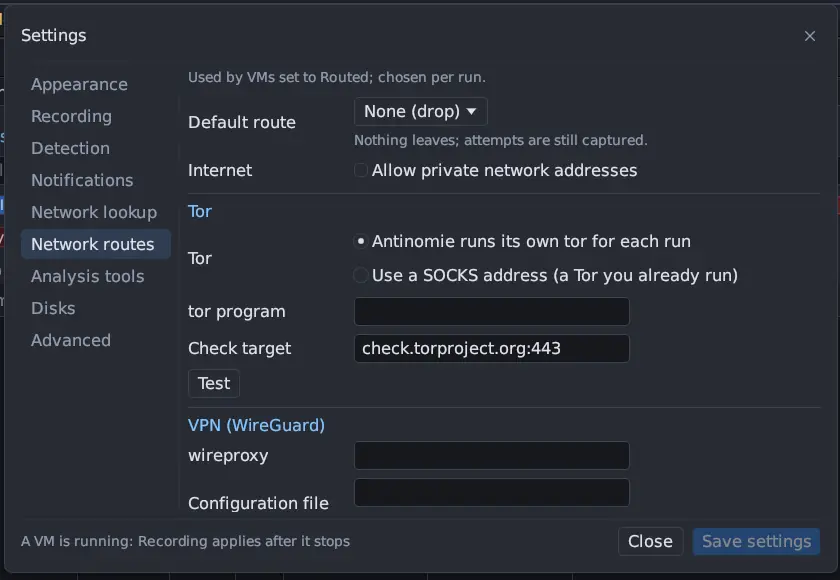
- Default route: the route a run uses unless the Run form picks another. The line below it describes the route in one line; the full text is the picker’s tooltip.
- Internet → Allow private network addresses: off by default.
- Tor, VPN (WireGuard), SOCKS5 proxy and InetSim (fake services): the settings described above, each with a Test button (InetSim has none).
Choosing a route for a run
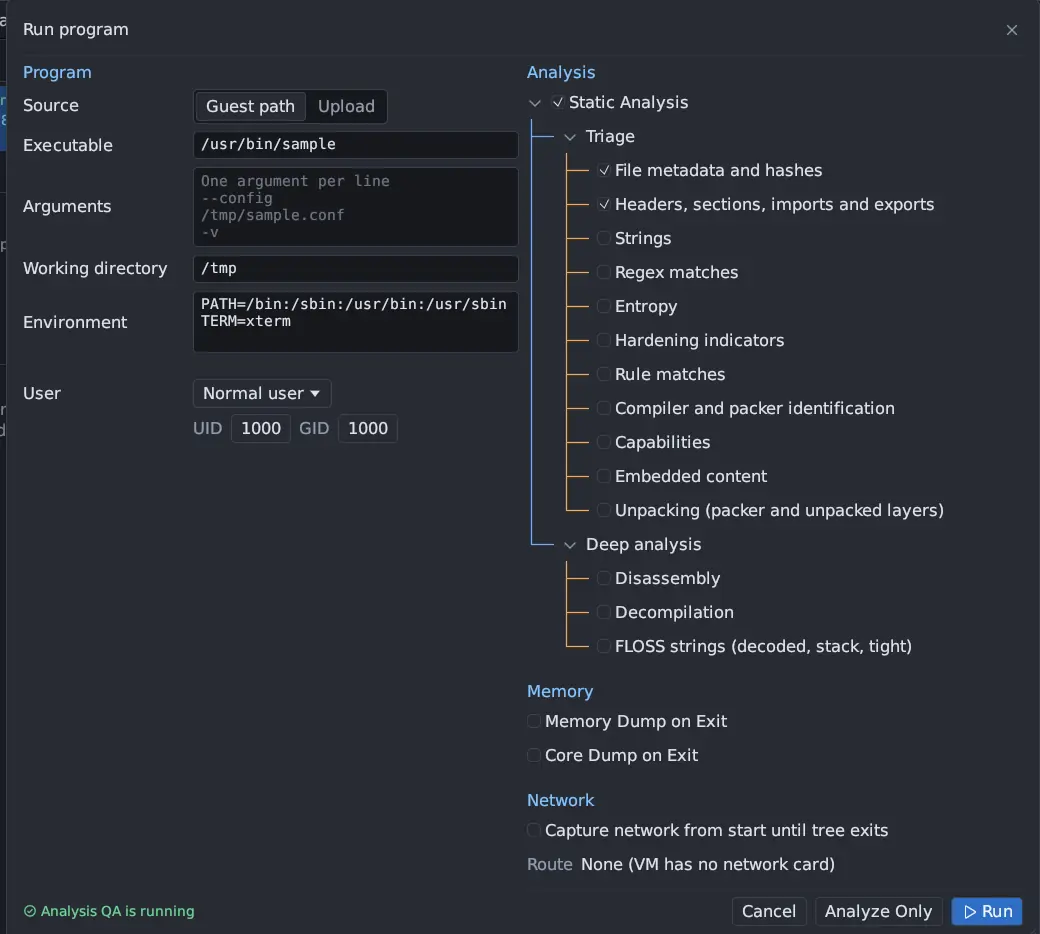
Section titled “Choosing a route for a run”- Start the Routed VM and open Run program.
- Under Network, Route lists the six routes, set to the default from Settings. The line below explains the chosen route.
- Optionally tick Capture network from start until tree exits to keep a packet capture bound to the run.
- Press Run.
A route whose settings are missing (no VPN configuration file, no SOCKS5 host)
shows a warning in the form, … The run will not start until it is set. On a
VM that is not Routed, the Route line names the VM’s fixed network instead,
for example None (VM has no network card), and its tooltip says to set the
network to Routed to choose per run.
A VM has one route at a time, so runs that overlap must use the same one. The route is claimed when the run starts and released when it ends.
Checks and failing closed
Section titled “Checks and failing closed”- Test on each route brings it up the way a run would and connects through it to its check target; VPN starts wireproxy, and Tor its own tor, for the test and stops it again. The result shows beside the button, or Not up with the reason.
- Before a sample starts, the route is checked the same way.
- A route that cannot start stops the run with the reason. Antinomie never falls back to another route, and in particular never to the plain Internet.
What the gateway carries
Section titled “What the gateway carries”- TCP and DNS only. UDP other than DNS (and DHCP) is dropped on every route; the capture still shows the attempts.
- Ping is answered only for the gateway itself.
- IPv6 is not carried on any route.
- On Tor, VPN and SOCKS5, the gateway answers each DNS question with a stand-in address from 198.18.0.0/16 and remembers the name; when the guest connects to that address, the proxy is given the name, so the proxy resolves it and no lookup leaves the host by another path. A name that does not exist shows to the guest as a refused connection.
- With a Cloud VPS profile, the gateway also answers the provider’s metadata address on every route, None (drop) included, with per-run canary credentials New in 0.8.0.
What is captured on each route
Section titled “What is captured on each route”A network capture records the frames between the guest’s card and the gateway: the guest’s own view, on every route. It does not show the hop from the gateway onwards (the Tor circuit, the WireGuard tunnel, the proxy connection), which happens on the host.
| Route | What the capture shows |
|---|---|
| None (drop) | The guest’s DHCP, its DNS questions without answers, and connection attempts (SYNs) that get no reply. |
| Internet | DNS answers with the real addresses, and the guest’s connections to them with the real responses. |
| InetSim | Every DNS answer pointing at the sinkhole address (198.51.100.1 by default), and the guest’s connections to that address with the fake services’ responses. |
| Tor, VPN, SOCKS5 | DNS answers with stand-in addresses from 198.18.0.0/16, and the guest’s connections to those addresses with the responses that came back through the proxy. TLS server names and HTTP Host headers still name the real hosts. |
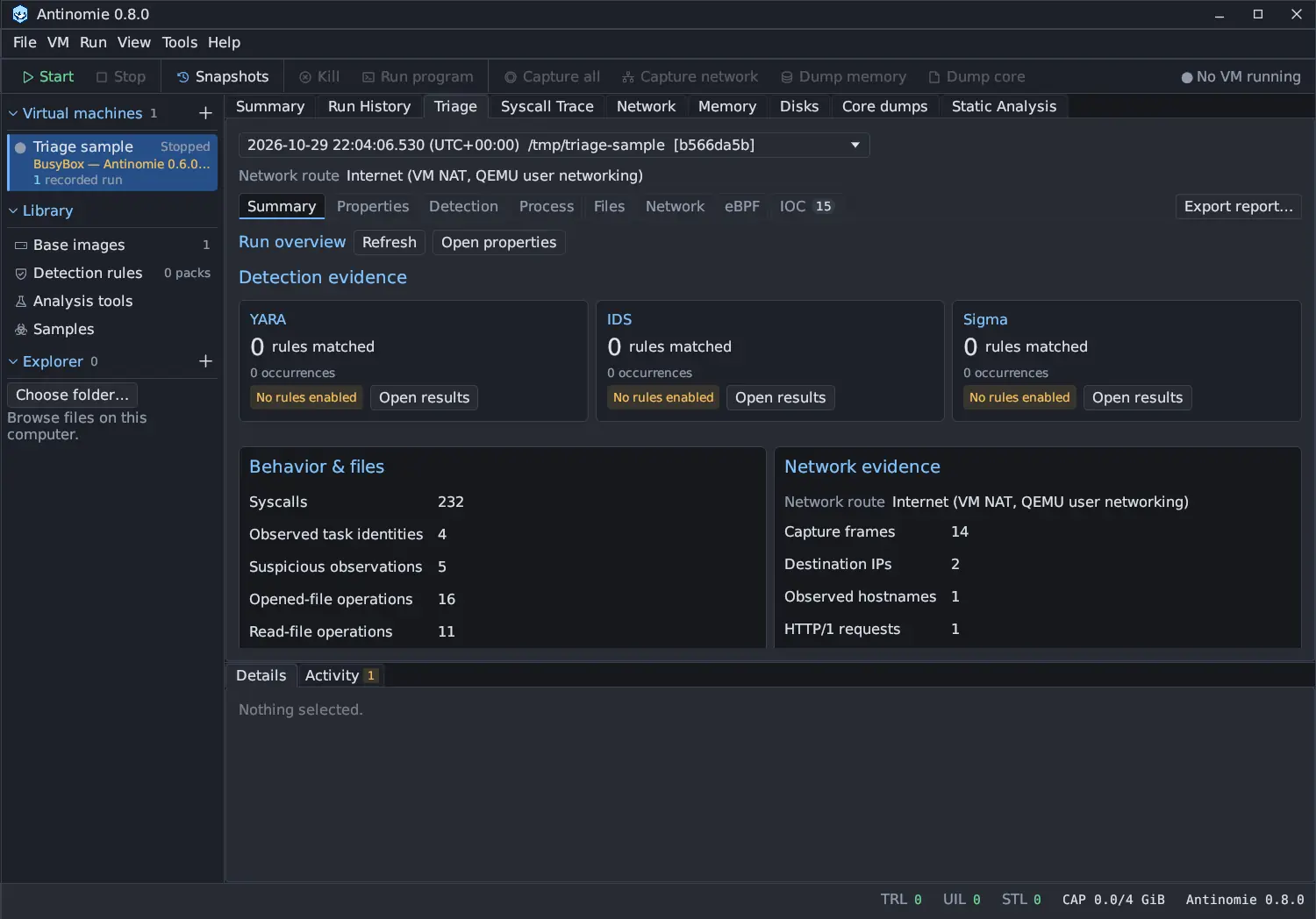
So on a proxied route, read hosts by name: Triage › Network lists the names under Domains with their stand-in addresses, and the Endpoints tab shows 198.18.x.y addresses rather than the servers’ own.
Where a run’s route is recorded
Section titled “Where a run’s route is recorded”The route a run used is saved with it. It is shown in Run History’s details
(Network route), in Triage › Summary under network evidence and at the
top of Triage › Network (Route: …). Its tooltip explains the route and adds what the
gateway counted once the run’s process tree ended, for example The gateway counted: 3 TCP connections, 5 DNS queries, 2 UDP dropped. The counts cover the
whole VM during the run, as the capture does. Runs saved before routes existed
read Not recorded. A run on a VM that is not Routed records the VM’s fixed
network as its route, for example Internet (VM NAT, QEMU user networking).