

Cloud VPS profiles
New in 0.8.0 This page describes Antinomie 0.8.0, which is in development. The current release, 0.7.1, has no Cloud VPS preset.
Most Linux malware runs on rented servers, not on desktop PCs. On a cloud instance the honest signs of KVM are normal: the CPUID hypervisor flag, kvm-clock, virtio devices and the provider’s own firmware strings. What gives a sandbox away there is an empty, freshly built system and a cloud that does not answer. The Cloud VPS stealth preset therefore does the opposite of the realistic PC presets: it leaves the hypervisor visible and makes the VM an instance of a real provider, down to its metadata service.
Choosing a provider
Section titled “Choosing a provider”In the VM dialog, set Stealth to Cloud VPS, or choose it as the Preset in the Stealth profile window. A second list then picks the provider; the Machine row of Hardware identity shows it.
| Provider | Chipset | MAC prefix | DHCP network | Metadata address | Default user | Region |
|---|---|---|---|---|---|---|
| Tencent Cloud CVM | i440FX (PIIX3) | 52:54:00 |
10.3.0.0/22 | 169.254.0.23 (metadata.tencentyun.com) |
ubuntu |
ap-guangzhou |
| Alibaba Cloud ECS | i440FX (PIIX3) | 00:16:3e |
172.16.0.0/20 | 100.100.100.200 | root |
cn-hangzhou |
| DigitalOcean Droplet | i440FX (PIIX3) | random, locally administered | 10.116.0.0/20 | 169.254.169.254 | root |
nyc3 |
| Vultr Cloud Compute (VC2) | q35 (ICH9) | 56:00:03 |
10.1.96.0/22 | 169.254.169.254 | root |
ewr |
A cloud profile takes from its provider:
- the DMI strings (BIOS, system, board, chassis, processor and memory makers), with SeaBIOS and the firmware’s “system is a virtual machine” bit set, as on the provider’s machines;
- the QEMU machine type, which sets the chipset:
pc(i440FX and PIIX3), which Tencent, Alibaba and DigitalOcean still launch, orq35for Vultr; - virtio network card and disk (
vda) and one memory module sized to the VM; Tencent also gets the VMware mouse port, and Tencent and DigitalOcean an empty QEMU DVD-ROM drive, as their instances have; - the provider’s MAC prefix and DHCP network.
The CPUID hypervisor flag, the KVM signature and kvm-clock stay visible on purpose: a hidden flag behind a cloud’s DMI strings would itself be odd.
The 2.75 GiB limit for i440FX
Section titled “The 2.75 GiB limit for i440FX”The guest transport maps guest RAM the way the q35 chipset lays it out. i440FX
lays RAM out the same way only below 2.75 GiB. A VM with an i440FX provider and
2.75 GiB of RAM or more therefore starts as q35, and the start log says
Stealth setting not applied: i440FX machine type; … q35 used. Keep such a VM
below 2.75 GiB of RAM to keep the provider’s chipset.
A lived-in first start
Section titled “A lived-in first start”The first start with a provider writes a lived-in instance into the VM’s disk,
offline, with the same tool that sets up Debian accounts (guestfish). It
works on BusyBox and Debian Minimal alike and writes:
- cloud-init’s data, instance folder and logs;
- an aged host name in
/etc/hostname(for Tencent,VM-<a>-<b>-ubuntufrom the private address); - the provider’s default user, added when the base lacks it, with a shell
history,
auth.logand login records (wtmp) of past SSH sessions; - the provider’s agent directories and units as one-line inert stubs, for
example
/usr/local/qcloudon Tencent,/usr/local/aegison Alibaba and/opt/digitalocean/bin/droplet-agenton DigitalOcean. No provider binary is copied, and no agent process runs.
All of it carries ages of hours to twelve days. cloud-state.json in the VM’s
folder records the provider and instance id, so later starts leave the disk
alone. A failure does not stop the VM; it adds a “not applied” line to the
start log. The bases stay one image for every profile: the lived-in state is
per VM.
The fake metadata service
Section titled “The fake metadata service”A real instance asks its provider’s link-local metadata address for its identity and credentials. An instance with no answer there is a sandbox.
When the VM’s network is Routed (route per run), Antinomie’s gateway answers the provider’s metadata address on TCP port 80 itself, on every route, None (drop) included, and resolves the provider’s metadata name to it. A thread in the app answers over an in-process socket pair: nothing listens on the host, nothing leaves it, and no real cloud is asked. The other providers’ addresses go unanswered, as they would on that provider.
The answers follow the provider’s layout (/latest/meta-data/… for Tencent
and Alibaba, /metadata/v1/… and /metadata/v1.json for DigitalOcean,
/v1/… and /v1.json for Vultr) with the VM’s instance id (from its system
UUID), host name and region.
Canary credentials
Section titled “Canary credentials”The credentials the service hands out are canaries: random values,
generated anew for each run, in the provider’s layout. Tencent gets a CAM role
(TmpSecretId, TmpSecretKey, Token), Alibaba a RAM role (AccessKeyId,
AccessKeySecret, SecurityToken), and DigitalOcean and Vultr a token in the
instance’s user data. Every value contains ANTCANARY (for example
AKIDANTCANARY… or dop_v1_antcanary…), so whoever receives one can tell what
it is, and no cloud accepts it. No real credential, key or metadata response of
a provider is used.
The gateway also looks for the run’s canary values in the plain-text TCP the guest sends to any other address. TLS hides them, so a canary sent over HTTPS is not seen.
In Triage
Section titled “In Triage”At the end of the run, cloud-metadata.json in the run’s folder records the
requests, the credentials handed out and every use of a canary. Triage reads it
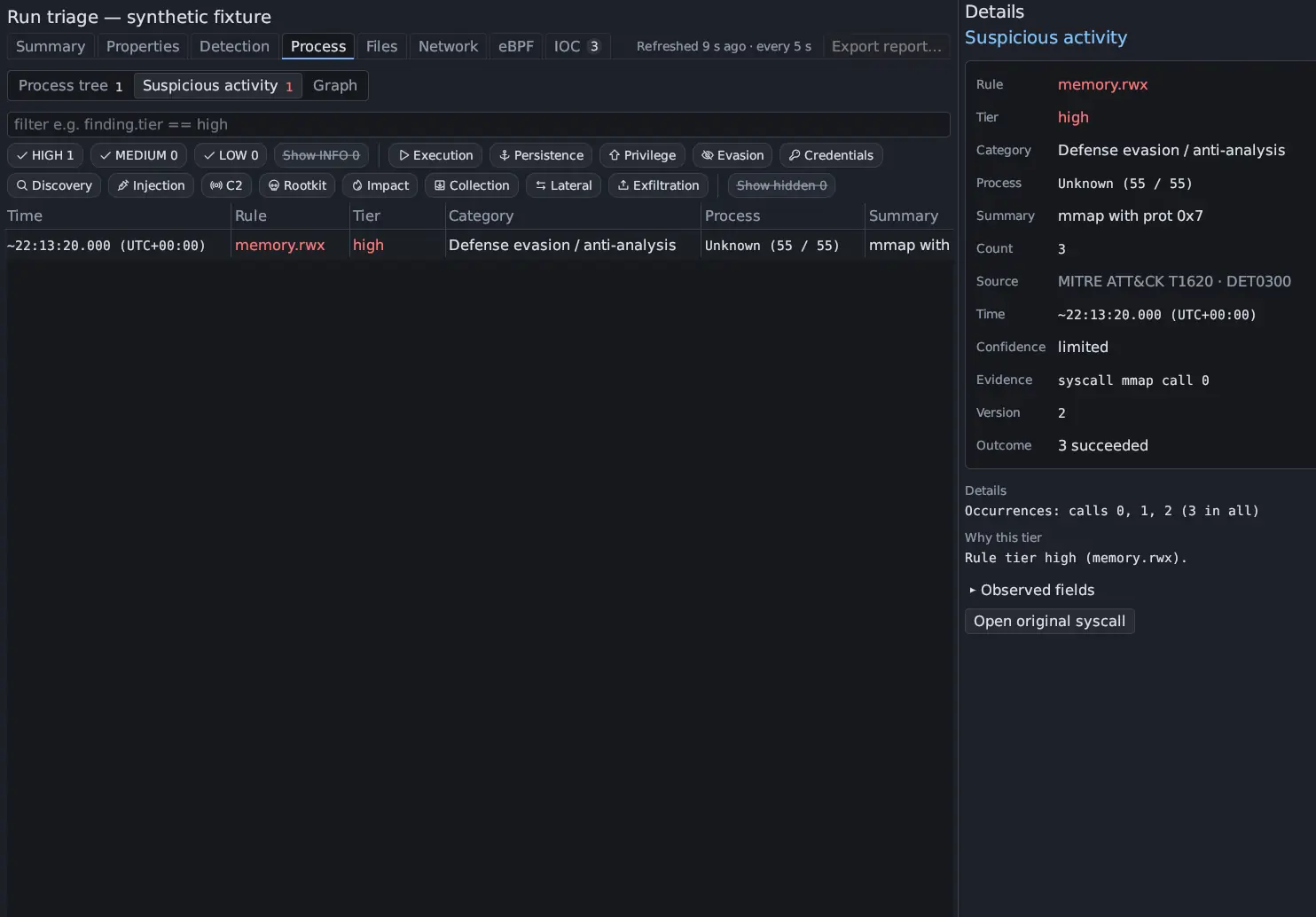
as findings in Process › Suspicious activity, all HIGH and mapped to
MITRE ATT&CK T1552.005 (Unsecured Credentials: Cloud Instance Metadata
API):
| Rule | Means |
|---|---|
credential.cloud_metadata |
The guest asked the metadata service. It also matches the metadata addresses and Tencent’s metadata name in the run’s calls and capture. |
credential.cloud_credentials |
The instance role’s credentials were read from the metadata service. |
credential.canary_used |
The run’s canary credential was sent to another address. |
The place a canary was sent to is also listed as an endpoint indicator in the IOC section, and the request, the role path and the destination appear in each finding’s Details.
Limits
Section titled “Limits”The Stealth window’s Still visible list for a cloud profile names what remains:
- the QEMU/KVM hypervisor, visible by design as on the provider’s machines;
- QEMU’s user-network addresses (10.0.2.x) on NAT, if the profile has no network of its own;
- the metadata service, which answers only on a Routed network;
- the emulated display (Bochs or virtio-gpu), not the provider’s Cirrus, QXL or Bochs;
- PCI subsystem IDs, and the provider’s own PCI bridges and balloon device;
- DNS servers inside the DHCP network, not the provider’s (their real resolvers are public addresses, which the NAT cannot give);
- no provider agent process runs (files and stubs only);
- a fresh boot’s few minutes of uptime.
Hetzner and Linode (Akamai) are not covered: no public dump of their DMI
strings was found, and nothing was guessed. Every cloud value has a source
class: seen in a public dump of the provider, seen in another dump, or a
recollection still to be checked. The metadata path layouts are from the
providers’ documentation and have not all been re-checked against live
instances. The sources and gaps are listed in
SOURCES-cloud.md.
See also Stealth profile for the PC presets and Network routes for the Routed network the metadata service lives in.