

Recording incomplete
A run is incomplete when something stopped Antinomie from saving all of it. The app says so in Run History, Syscall Trace, Triage, Details and Summary, always with the cause. This page describes Antinomie 0.8.0, which is in development; the current release is 0.7.1.
Saving stopped
Section titled “Saving stopped”When saving stops for a run, its row in Run History shows Saving stopped,
its tooltip says Recording incomplete: saving stopped: ..., and the same warning
appears in Syscall Trace, Details and Triage with a dismiss control. The
full cause is in the run’s details. Activity keeps the run-specific entry.
Causes include:
- The recording quota was reached. The run, if still open, stops saving telemetry, objects and terminal output. Everything saved before stays intact.
- A disk or write error. The first cause stays the reported one.
- A terminal write failure. Stops saving for that run only, unless it was the quota, which stops every open recording.
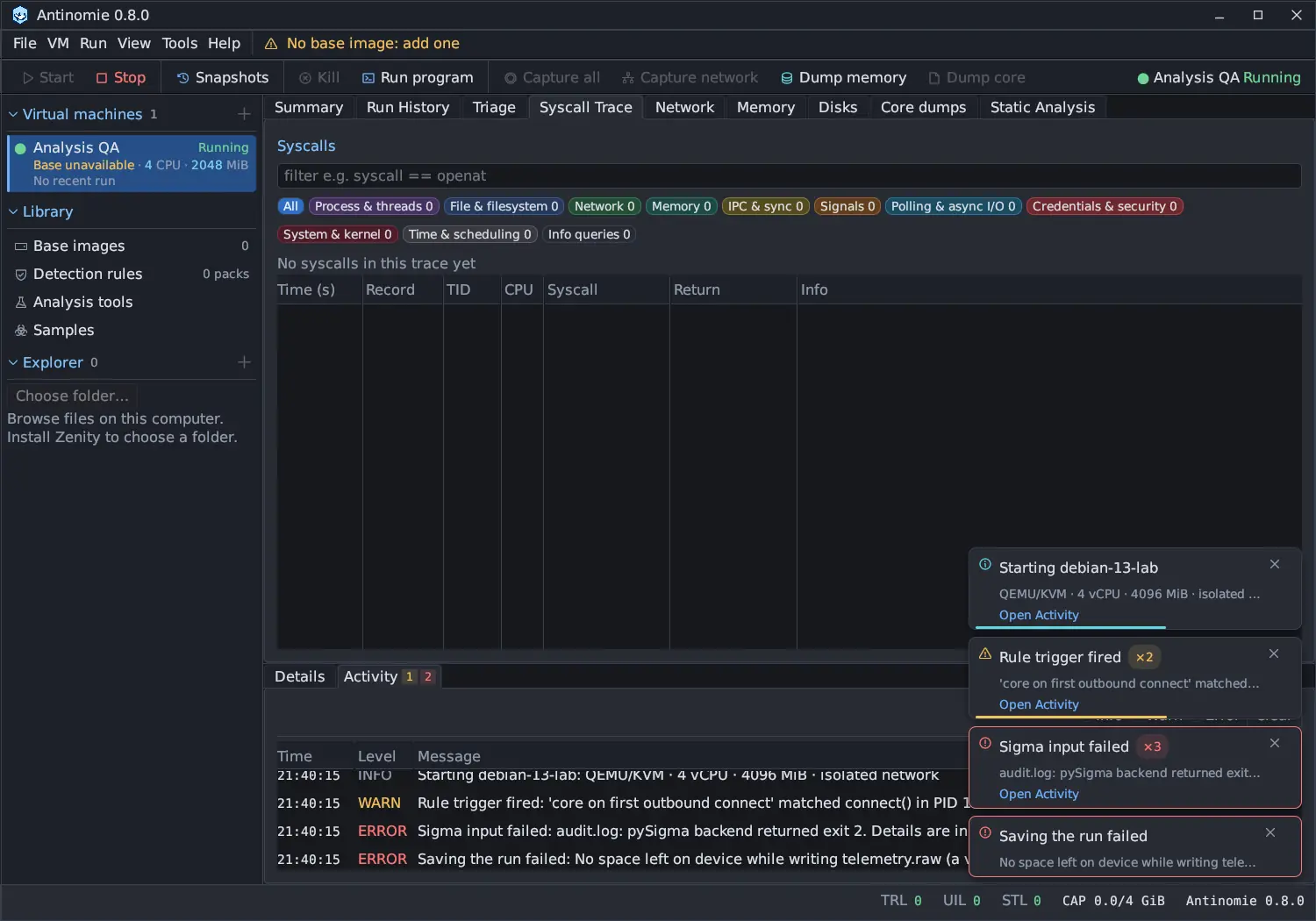
For your data: whatever was saved before the stop is readable. Nothing after it is in the recording. A run that had already ended before the quota was reached is not marked incomplete.
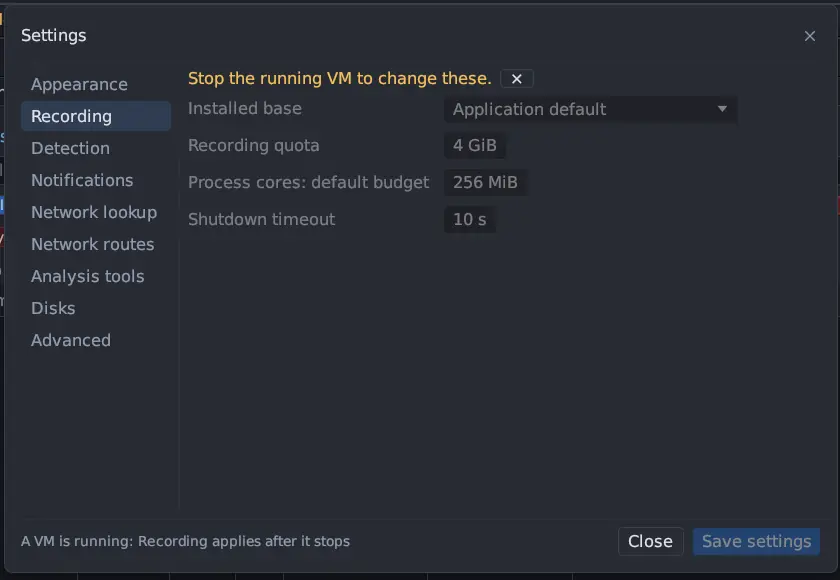
What to do: free space or raise the quota (Recording quota in Tools → Settings… → Recording), restart the VM, and repeat the run if you need the missing part. Raising the quota does not resume a running boot.
Notes are not failures
Section titled “Notes are not failures”A Note: line under a run records a fact about the recording that does not mean saving stopped. For example, telemetry the program sent before the host confirmed its launch can overflow a short buffer (16 MiB per run, 32 MiB overall, packets older than 5 seconds dropped). The run keeps a note with the loss, and the lost packets remain in the boot’s raw archives.
Terminal output is saved in full even when the screen could not keep up; see Terminal.
Another note says that a run continued after a transport reconnect: Recording continues after a transport reconnect (recording segment N), naming the boot
that holds the earlier part. The run is still one run, and Triage reads every
segment.
Finished, with observation incomplete
Section titled “Finished, with observation incomplete”Whether a run ended and whether everything was observed are two separate facts. A run’s Tree status is Finished when its process tree ended with no asynchronous request outstanding, or Stopped when you stopped it and the root died of a signal. If the guest could not observe everything, that stays beside the status as a note and in Summary, never instead of it.
Every run that uses io_uring reports incomplete observation, because the shared
ring does not prove which thread wrote a request. Such a run is still
Finished; its note reads Async observation loss reported: last guest count N, loss flag true. Saving may continue, but observation completeness is not proven.
Exit unknown
Section titled “Exit unknown”Root exit shows Unknown when the guest never recorded how the launched program ended. A base made before Antinomie 0.7.0 does this for some programs that use io_uring, when a worker thread is the last to leave; the run then finishes with the exit unknown, never read as exit 0. A base built for 0.7.0 or later records the exit in that case. A status reply the app cannot use names the fields it rejected and does not clear an exit already recorded.
Stop needed SIGKILL
Section titled “Stop needed SIGKILL”Stop and Kill send SIGTERM to every task of the run. On a base built for
Antinomie 0.7.0 or later, the guest waits a grace period of 4 seconds, then sends SIGKILL
to every task of the run still alive, including setsid() children and
orphaned grandchildren, and repeats it every 250 ms while any remain. A process
core being copied is not interrupted; the SIGKILL waits for it, at most 15
seconds more. Hovering the run’s Tree status in Run History then shows
Stop needed SIGKILL after the grace period. Root exit is the signal that ended the root:
Signal 9 after the escalation, or Signal 15 or its own exit code when it
obeyed SIGTERM. A task stuck in an uninterruptible sleep cannot be killed by any
signal; the run then stays live and says so.
With an older base, a program that ignores SIGTERM keeps running after Stop.
Async observation loss
Section titled “Async observation loss”An io_uring or AIO program can create more requests than the recorder tracks, or
finish a read in a context where memory cannot be read. The run then reports async
observation loss and an incomplete-observation flag. Summary lists
Runs with async observation loss (this boot) and the loss count for each, and
Activity shows one warning that is not repeated by later polls. The loss is
kept with the run.
For your data: some asynchronous requests or their payloads are missing. Synchronous calls are unaffected, and the run’s other data is intact. Async loss is separate from TRL, UIL and STL. See Async observations.
What to do: nothing is needed to keep the data you have. To capture more, run the same program with less concurrency, or accept the gap.
Incomplete calls
Section titled “Incomplete calls”A single call can be incomplete without the run being incomplete: a field captured as COPY_FAULT or NOT_RESIDENT, or a call whose exit was never recorded. Syscall Trace flags these on the call. See Capture statuses.
Reading an incomplete run safely
Section titled “Reading an incomplete run safely”- Say so in your notes. An unavailable item is different from an empty result.
- Absence of a call proves nothing: it may be lost, not skipped.
- If possible, repeat the run after fixing the cause.