

Custody log
Every sample in the library has a custody log: an ordered list of everything done to or by it, from the moment it arrived. Each entry is chained to the one before it by SHA-256, and a second chain over the whole library records every log’s head, so a changed, removed or reordered entry is found. Nothing in the log is ever edited or deleted; a correction is a new entry.
What is recorded
Section titled “What is recorded”| Event | When |
|---|---|
| Added | The archive was written, with where the bytes came from (Added from this computer: PATH, Dropped by a run: PATH, a download) |
| Origin added | The same bytes arrived by another route |
| Verified | The archive was read back and its SHA-256 compared |
| Sent into VM | The sample was sent into a VM |
| Seen in a run | A run on a VM ran the sample (Debian, run r1) |
| Run started, Run ended | A run of the sample started, with what it ran on and under, and ended |
| Terminal input | You typed into the run’s guest terminal. Only the size is kept: N bytes typed in the guest terminal (not recorded) |
| Your action | You changed something in the running guest: Network changed, Clock moved, Run killed, Snapshot restored |
| Sample activity | What the sample did in a run, such as a file it dropped (with its SHA-256) |
| Static analysis | A static analysis of the sample |
| Edited | You changed its name, description, tags or verdict |
| Original deleted | The original file was deleted after it was archived |
| Exported | A custody record or a report bundle with it was exported |
| Removed | The archive was removed |
| Migrated | The record was brought in from an earlier version |
Each entry also has a time and who made it (By): app or analyst. An
event never carries a run’s raw events (only hashes), and the text you type
into a guest terminal has no field to be stored in. The recording of the run
still keeps the terminal’s content; see
Recordings contain secrets.
The Custody log tab
Section titled “The Custody log tab”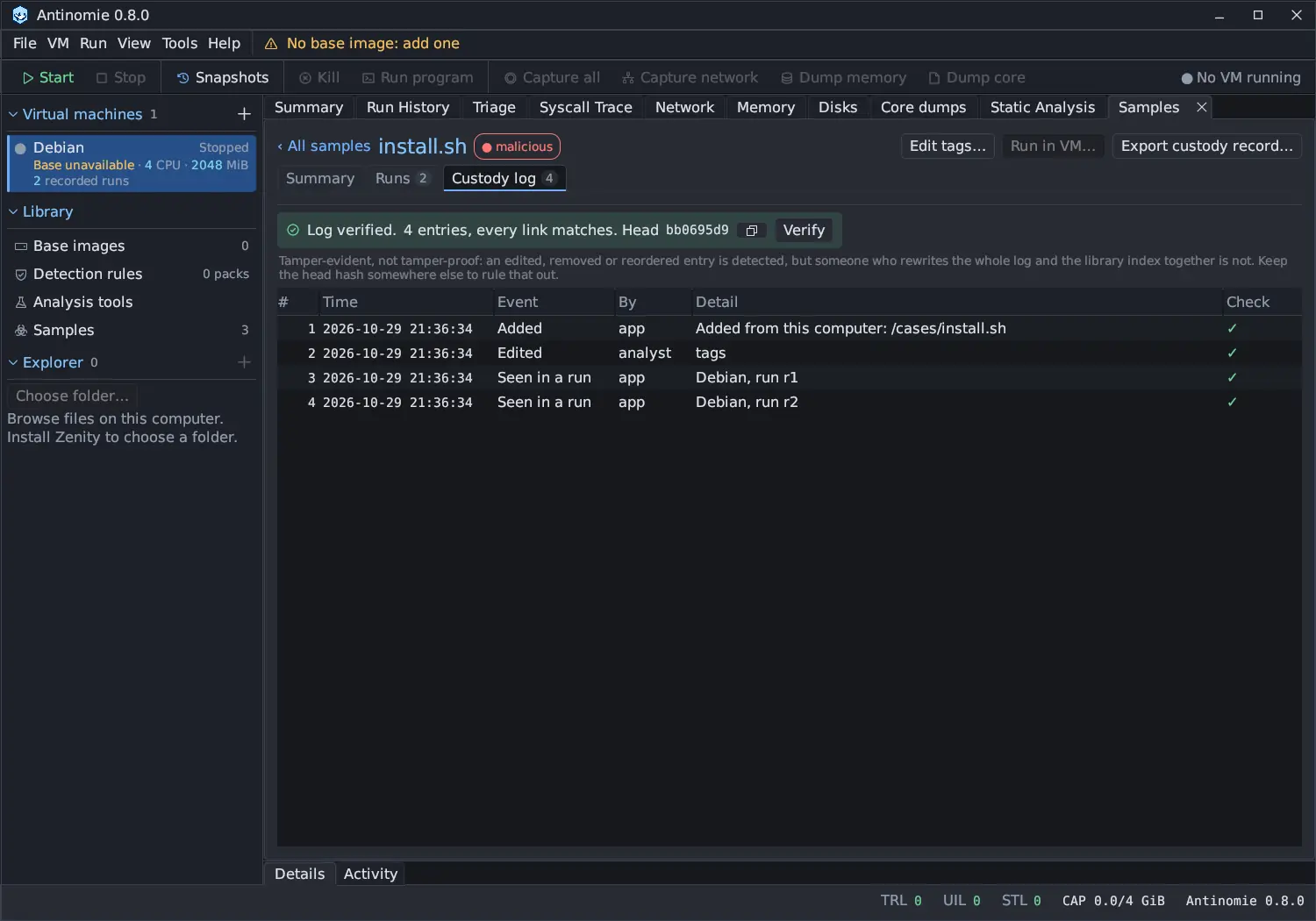
The Custody log tab of the sample window lists the entries in order: #, Time, Event, By, Detail and Check. Above them the banner shows the result of the last check and the head hash, the hash of the newest entry. Click the head hash, or its copy button, to copy it.
Verify recomputes every hash and compares the chain with the library index. Hover a check mark to see the entry’s previous and own hash; right-click for Copy entry hash and Copy previous hash.
How the chains work
Section titled “How the chains work”- Each sample’s chain. Entry N stores the SHA-256 of entry N−1 (the first stores 64 zeros), and its own hash covers all its fields and that link. Editing an entry breaks its hash; removing or reordering entries breaks the links.
- The library index chain. For every entry appended to any sample’s chain, the library also appends a record to one index chain: the sample, the entry number and the entry’s hash. It also records purges. Rewriting a whole sample chain consistently still disagrees with the index, and a sample log that disappeared is found.
Appending an entry and its index record is one database transaction, so two
writers cannot both extend the same head. A hash is SHA-256 over each field in
order, written as <UTF-8 byte length>:<field> and a newline. The entry fields
are antinomie-custody-entry-v1, the sample’s SHA-256, seq, at_ms, by,
kind, before_chain (0 or 1), detail and prev; the index fields are
antinomie-custody-index-v1, seq, at_ms, kind, sha256, entry_seq,
entry_hash and prev.
A broken chain
Section titled “A broken chain”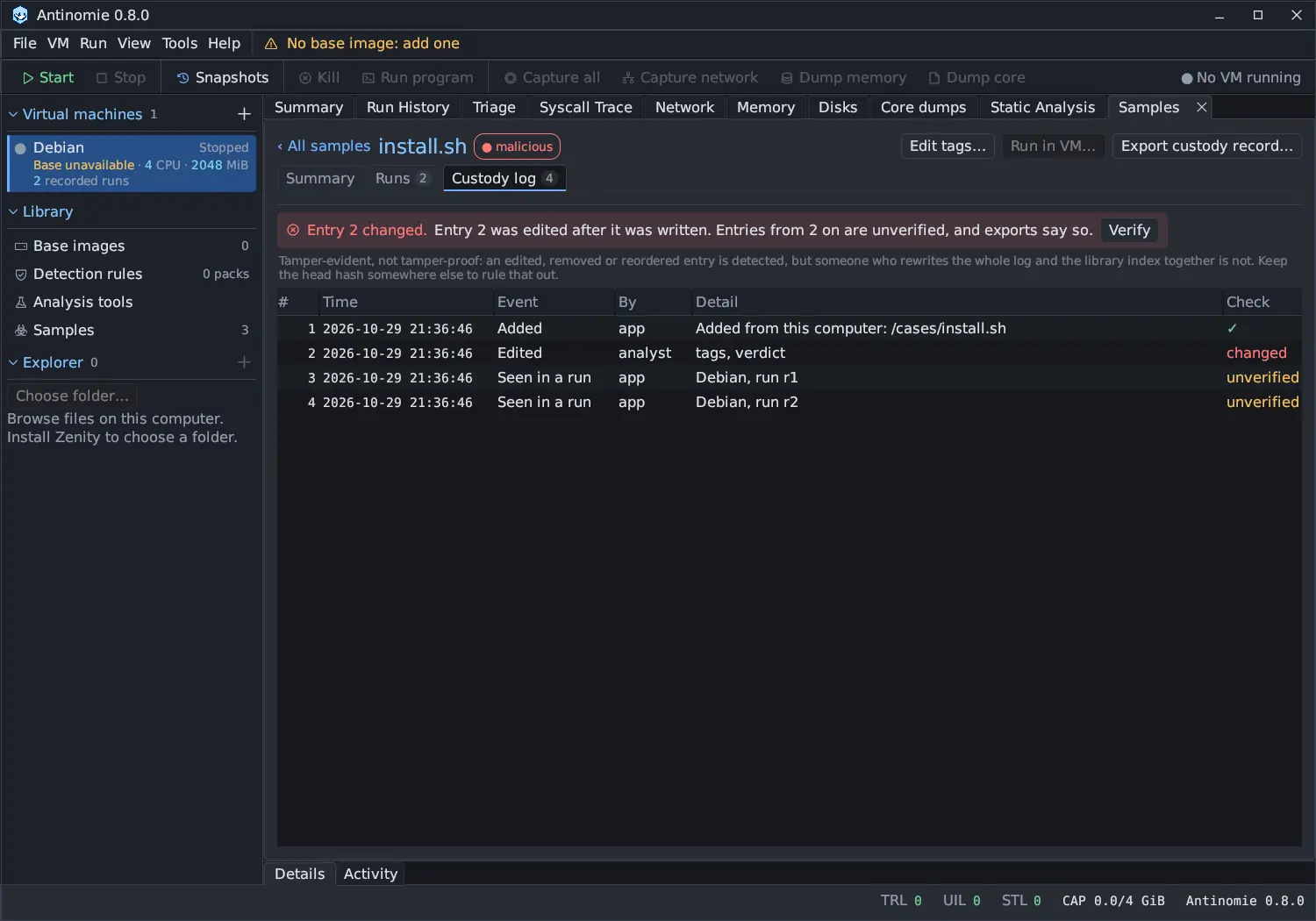
When a check fails, the banner says Entry N changed. with the reason, and that entries from N on are unverified, and exports say so. In the Check column that entry reads changed and every later one unverified: once a link is broken, the links after it no longer vouch for anything.
The reasons Verify can give include:
- entry N was edited after it was written
- entry N is missing
- entry N was replaced: entry M records another hash for it
- the first entry does not start the chain
- entry N is gone; the library index recorded it
- entry N differs from what the library index recorded
- entry N is not in the library index
- the whole log is gone; the library index recorded N entries
- index record N is missing, was edited or was replaced
A log that cannot be written (the library is locked, the disk is full) never fails or slows a run; the entry is lost, and Verify reports what is missing.
The library-wide view
Section titled “The library-wide view”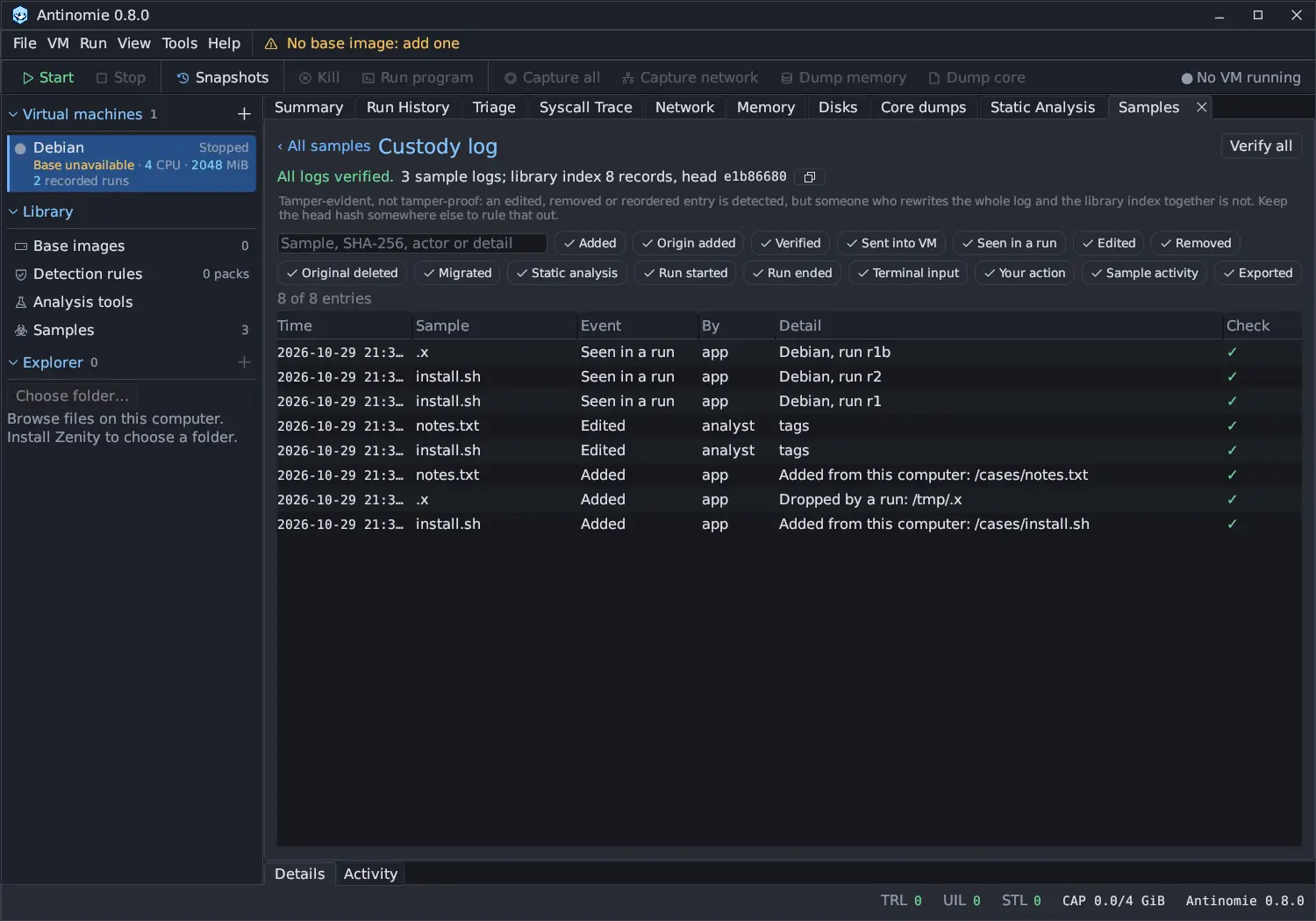
Custody log on the Samples page shows the entries
of every sample, newest first, with a Sample column. Type in the search box
to match the sample, its SHA-256, the actor or the detail, and use the
event-kind chips to show or hide kinds. A line says how many entries match, for
example 8 of 8 entries. Click an entry’s sample to open its custody log.
Verify all recomputes every hash of every sample and the library index. The result reads All logs verified. with the number of sample logs, the number of index records and the index’s head hash, or names the index record where the library index chain is broken and lists the sample logs that did not verify.
Exporting a custody record
Section titled “Exporting a custody record”Export custody record… in the sample window writes the log of one sample to a file you can hand to someone else.
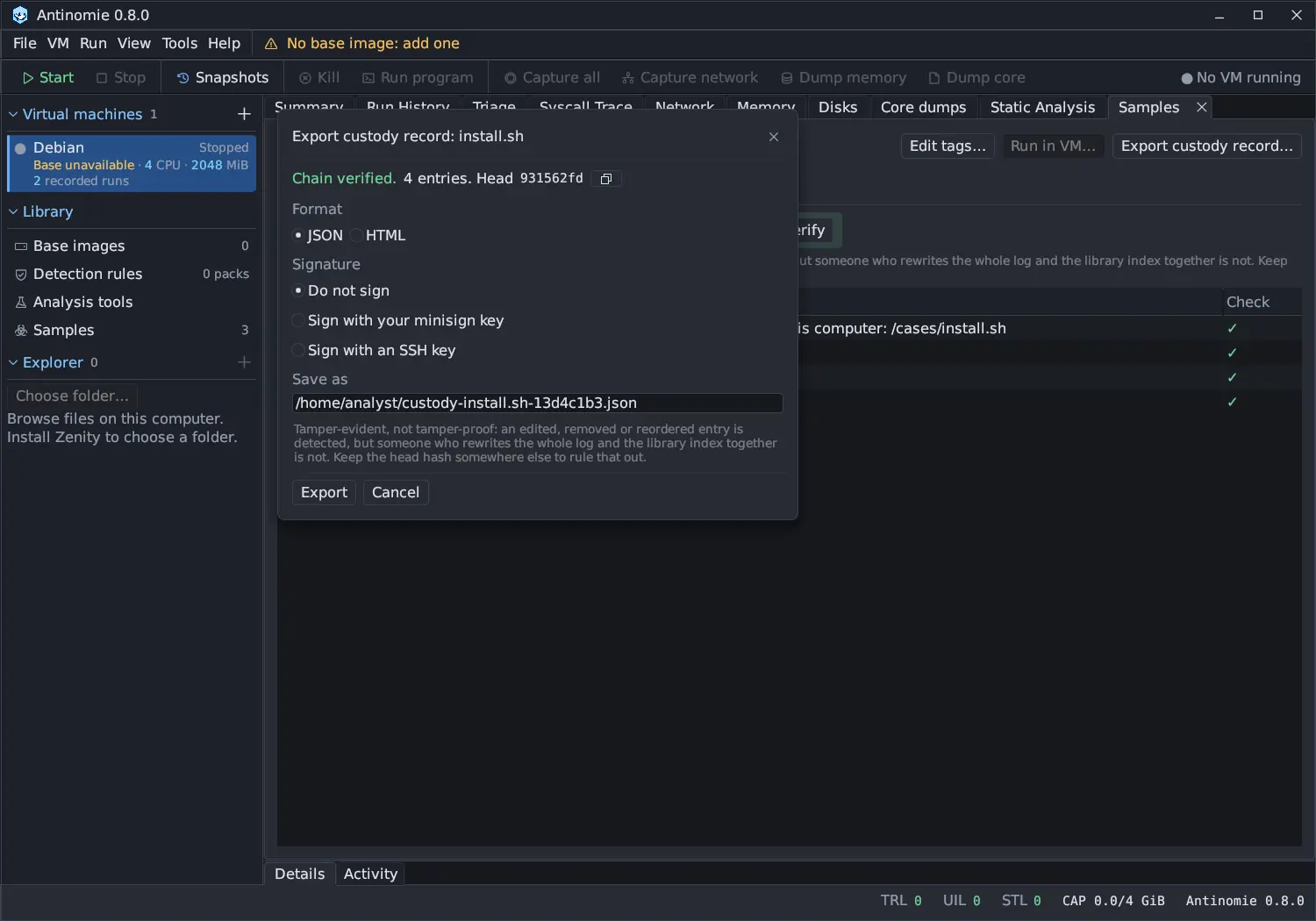
- Check the line at the top: Chain verified. with the entry count and head, or the problem. A record of a broken chain marks the changed entry and everything after it as unverified.
- Choose the Format:
- JSON: the entries and hashes exactly as stored (the event text is the
text that was hashed), the library index records about the sample, and the
result of the check at export time.
verify-custody.pyis written beside it. - HTML: a readable record with the same JSON embedded.
- JSON: the entries and hashes exactly as stored (the event text is the
text that was hashed), the library index records about the sample, and the
result of the check at export time.
- Choose the Signature:
- Do not sign;
- Sign with your minisign key: runs
minisign -Swith the key file you give; - Sign with an SSH key: runs
ssh-keygen -Y signin the namespaceantinomie-custody.
- For a signature, set Key file: your own key, not an app key.
- Check Save as (by default
custody-NAME-SHA8.jsonin your home folder) and press Export.
The export is itself recorded as an Exported entry.
Signing
Section titled “Signing”Antinomie has no signing key of its own. It runs your minisign or
ssh-keygen on the exported file, never reads the key file itself and never
asks for a passphrase: a key that needs one must be loaded in an agent. The
signature is written beside the file, as FILE.minisig or FILE.sig. Check it
with the usual tools, for example:
minisign -Vm custody-install.sh-13d4c1b3.json -p minisign.pubssh-keygen -Y check-novalidate -n antinomie-custody \ -s custody-install.sh-13d4c1b3.json.sig < custody-install.sh-13d4c1b3.jsonVerifying without Antinomie
Section titled “Verifying without Antinomie”verify-custody.py uses only Python’s standard library. It recomputes every
hash from the entries alone and checks them against the index records in the
file:
python3 verify-custody.py custody-install.sh-13d4c1b3.json # or the .html exportIt prints verified: N entries, every link matches and the head, or NOT verified: entry N changed (…), and exits with 0 when the chain is intact, 1
when it is not and 2 when the file cannot be read.
Removal and purge
Section titled “Removal and purge”Remove… on the Samples page deletes only the archive. The record and the custody log stay, with a Removed entry, so the history of the sample is kept. A full purge, which deletes the archive, the record and the log, is a separate operation. The library index chain records the purge first, with the head the log had, so a purged log is accounted for and is not reported as a missing log. The Samples page offers Remove… only.
Entries from earlier versions
Section titled “Entries from earlier versions”Samples and events from versions before 0.8.0 are migrated into the log once, when 0.8.0 first opens the library. Their entries are marked recorded before the custody log (in the global view, after the event name), and that mark is part of each entry’s hash. They are as old as the original records, but were not chained when they happened.