

File Reconstruction
The Files section of Triage tells you which calls a run made on a file. In 0.8.0 it can also tell you what the file’s bytes were: what the run wrote, what the file held before the run touched it, and, call by call, what each byte was at every point of the run. Nothing is invented: a byte nobody saw stays unknown, and every missing range says why.
This page covers the four parts that make that work, then the File Reconstruction window that puts them together.
Per-file history
Section titled “Per-file history”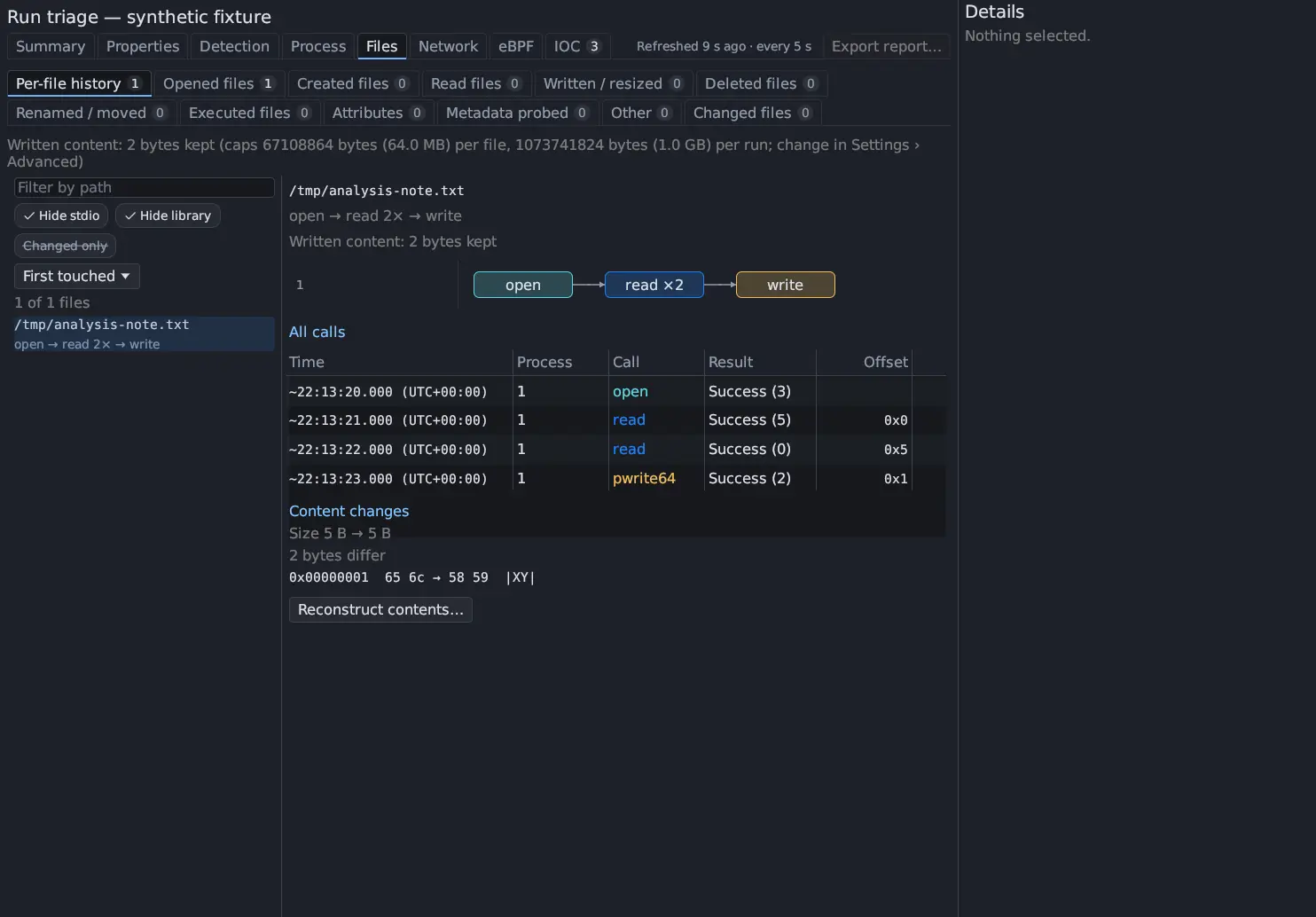
Triage › Files › Per-file history, the first Files tab, lists every file the run touched. Choose a file to see its history as a graph of calls, the calls themselves with their Offset, Length and the first 64 bytes of Content, and Content changes: the file’s size before and after, the bytes that differ between what the run saw first and last, and the guest’s SHA-256 when it took one. In Changed files, the Per-file history button in Details opens this tab on the selected file. See Triage files for the tab itself.
Written content, kept within caps
Section titled “Written content, kept within caps”Every write the guest kernel captured is indexed per file as a byte range (offset and length) that reads back exactly from the run’s recording, however many writes the file took. The list of calls shown per file is bounded; the written content is not, apart from two caps:
| Cap | Default |
|---|---|
| Per file | 64 MiB |
| Per run | 1 GiB (1024 MiB) |
Past a cap, the first writes are kept and the later ranges are listed as not
captured, never silently dropped. The tab’s header line says how much was kept
and what the caps are, for example Written content: 2 bytes kept (caps … per file, … per run; change in Settings › Advanced). Each file shows its own
Written content: line and up to eight ranges that were not kept, as not captured: N B at offset X (reason).
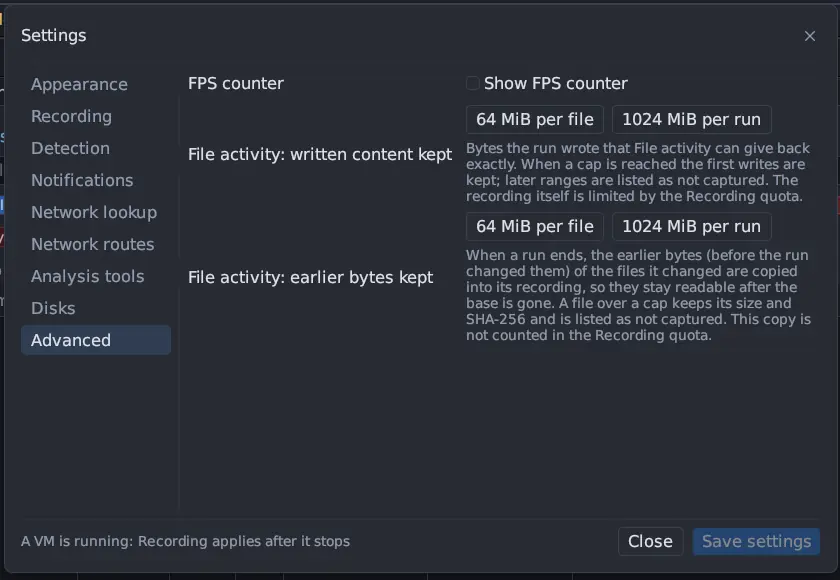
Change the caps in Settings › Advanced › File activity: written content kept. The recording itself is still limited by the Recording quota.
Why written bytes can be missing
Section titled “Why written bytes can be missing”| Reason | Meaning |
|---|---|
| past the per-file cap, past the per-run cap | The write was captured, but the cap was already reached |
| not recorded by the kernel | The guest did not capture the write’s data |
| at an unknown offset | The host could not tell where in the file the write landed (an append or a shared descriptor without a position record, on an older base) |
| written through a mapping, past the guest’s copy budget | Pages of a shared mapping beyond the 4 MiB the guest copies per call |
Earlier bytes: what the file held before the run
Section titled “Earlier bytes: what the file held before the run”The trace records what a run wrote, not what it overwrote. For a file that existed when the run started, Antinomie reads its earlier bytes from the disk the run started from.
- At every boot, the disk the VM was left in is sealed under a fresh, empty layer. This is instant and copies nothing, and the boot cannot overwrite the sealed disk. So even a plain restart of a used VM has a readable starting state, like a new VM.
- While the boot runs, a changed file’s earlier bytes are read on demand from that starting disk (the installed base, any checkpoint and the sealed layer), with the sandboxed disk reader over the qcow2 chain. Nothing is mounted and nothing is copied into the recording.
- When the boot is over and its recording is saved, the earlier bytes of
only the files the runs changed are copied into the recording (
file-before/), and the sealed layer is merged back down at once. From then on the earlier bytes read from the recording alone, even after the base or the checkpoint is deleted.
The sealed layer is not a snapshot: it never appears in Snapshots, and your snapshots are never merged or changed. There is at most one extra layer, and only while the VM runs. If the app or the machine stops mid-run, the VM still boots, and the next start of the VM or of the app finishes the copy and the merge. Several runs in one boot share the boot’s starting state.
A file is found on the starting disk by its path and, when the guest recorded its inode, by inode, generation, size, owner and time too, so a name that another file took over is not mistaken for it. The file’s header in the Per-file history says what was found, for example:
Earlier bytes: none, the run created this file (it started empty)Earlier bytes: 5 B on the starting disk, read when asked (the file's inode was checked against the disk)Earlier bytes: 5 B kept in this recording (matched by path only: the guest recorded no inode)
The copy into the recording has its own caps, Settings › Advanced › File activity: earlier bytes kept (64 MiB per file and 1024 MiB per run by default). It is not counted in the Recording quota. A file over a cap keeps its size and SHA-256 and is listed as not captured.
Why earlier bytes can be missing
Section titled “Why earlier bytes can be missing”| The header says | Why |
|---|---|
not on the starting disk: … |
The file is on tmpfs (such as /dev/shm, /run, or /tmp where it is a RAM disk) or another mount, or the name belongs to another file on the disk |
not offered, the file was … (limit 1 GiB) |
The file is over 1 GiB |
not captured, the file was … (…) |
The file is over an earlier-bytes cap; its size and SHA-256 are kept |
unavailable: a snapshot restore replaced the disk while the run was using this file |
The disk under the file changed during the run |
unavailable: the run's starting disk was not recorded … |
A recording made before Antinomie kept the starting disk, or a boot that could not save it |
unavailable: not looked up: only the first 300 changed files are |
Only the first 300 changed files of a run are looked up |
Real file positions
Section titled “Real file positions”With a base built for 0.8.0 (guest contract revision 18), each read and write of a regular file carries the position the file system used, and each write the order in which the file system applied it. As a result:
- an
O_APPENDwrite, or a write through a descriptor shared with another process (afterforkordup), lands at its real offset instead of at an unknown one; - when two processes write the same range at once, the bytes of the write applied last win, as they did in the guest, whatever order the calls returned in.
An older base keeps working without these records; such writes are then counted at an unknown offset.
In-kernel copies
Section titled “In-kernel copies”sendfile, splice, copy_file_range, a reflink clone (ioctl FICLONE or
FICLONERANGE) and fallocate move or change bytes inside the kernel. With a
revision-18 guest, each records its operands: both files, both offsets, the
length, and the destination’s size after the call. Such a call changes only its
own range of the destination. The bytes a splice from a pipe put into a file
cannot be read again, so the guest sends them along (up to 1 MiB per call), and
they show as written content.
Writes through shared file mappings
Section titled “Writes through shared file mappings”A program that stores into a MAP_SHARED mapping of a file makes no system
call. With a revision-18 guest, the pages it changed appear in the file’s
history and its written content, marked through a shared mapping, with their
bytes, when msync (or fsync, sync) wrote them back, or when munmap, an
exec or the program’s exit dropped them while dirty.
Each page is known as it was at that moment, not every store before it. Pages
beyond the guest’s 4 MiB copy budget per call are listed as not captured, with
the reason. The guest’s hash at the file’s last close covers the final
content. Not seen: a page the kernel’s background writeback cleaned while the
mapping stayed and that was not stored to again, and mappings of the kernel’s
own files (shared anonymous memory, System V shared memory, memfd).
The File Reconstruction window
Section titled “The File Reconstruction window”- Open Triage › Files › Per-file history and choose a file.
- Press Reconstruct contents… under Content changes. You can also right-click a row in any Files tab and choose Reconstruct contents….
- The File reconstruction window opens on that file.
The window replays the file’s reads, writes, resizes and zeroed ranges in the
order the file system applied them, over what the file held when the run
started. The header shows the path, any other names (also seen as …), whether
the run created or deleted the file, the size after the chosen call, and the
earlier-bytes line.
Stepping through the calls
Section titled “Stepping through the calls”Use the slider, ◀ and ▶, or the arrow keys, to move from Start (the
file before any call) to End. The line beside them reads Call N of M and
describes the chosen call, for example wrote 2 B at 0x1 or resized the file to 5 B.
The byte map
Section titled “The byte map”The map shows the file 16 bytes per row, as hex and ASCII. Each byte is shown as it is known at the chosen call; the legend above the map counts the bytes in each state, and hovering a legend entry names it:
| In the map (legend) | State | Meaning |
|---|---|---|
?? |
never seen | No call showed this byte |
The value, tinted (rd) |
seen in a read | A read showed the byte as it was then |
The value, tinted (bf) |
from the starting disk | The earlier bytes the file held when the run started |
The value, tinted (wr) |
written by the run | A write with captured data |
## |
changed, new value not captured | A call changed the byte, but its new value was not captured |
~~ |
may have changed through a shared mapping | A shared writable mapping covers the byte |
A byte that a later read or write shows takes that value. Under a shared
writable mapping, the pages the guest copied replace ~~ with their bytes, and
a page it never saw written stays ~~.
Click a byte for its Byte history: each state it went through and the time each was learned. What this call changed lists the ranges the chosen call changed. Text diff shows the lines a text file gained or lost since the start of the run, when every byte is known (files up to 1 MiB).
Checking against the guest’s hash
Section titled “Checking against the guest’s hash”Hash this state takes the SHA-256 of the reconstruction at the chosen call,
when every byte is known, and compares it with each hash the guest took of the
file. Go to the last hash moves to the point where the guest took its last
hash. A match says the reconstruction is byte-exact. A hash cannot be taken while
bytes have no value (??, ##, ~~), while the size is not known, or when
some earlier bytes could not be read back because the starting disk is gone.
Saving
Section titled “Saving”- Save reconstruction… writes the file as reconstructed to
reconstructed/in the recording, with unknown bytes as00, and a.maskfile beside it with one byte per file byte:00known,01unknown,02not captured,03mapping. - Copy hex copies the byte map as hex (the first 256 KiB).
- Show call in Trace opens the original syscall of the chosen call.
In a report
Section titled “In a report”The File activity and reconstruction section of Export report… lists every created or changed file with its final size, the guest’s SHA-256, whether its reconstruction is complete, and the bytes written, not captured and unknown.