

Report export and evidence bundle
Export report…, the button at the right of the Triage tab row, writes the whole Triage of the selected run as a report: for a case file, a colleague, or a threat-intelligence platform. It needs the run’s saved recording.
The dialog
Section titled “The dialog”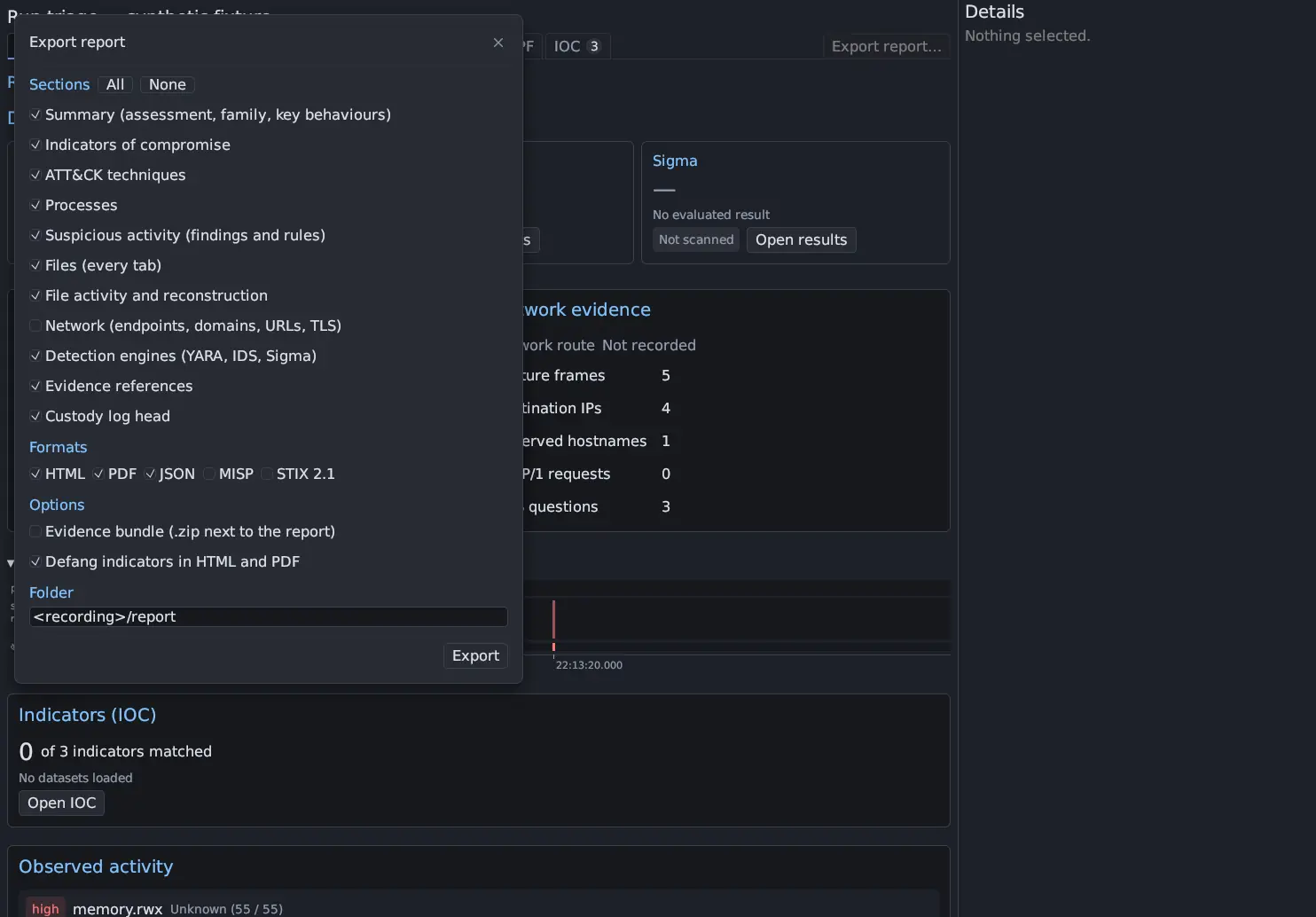
- Under Sections, tick what the report should contain (All and None set every box). An unticked section is absent from every format.
- Under Formats, tick one or more of HTML, PDF, JSON, MISP and STIX 2.1.
- Under Options, choose Evidence bundle (.zip next to the report) and Defang indicators in HTML and PDF.
- Set the Folder, or leave
<recording>/reportto write into the recording’sreport/folder. - Press Export. It needs a format or the evidence bundle. The dialog shows its progress (indexing the whole run, building the report, reading the custody log, writing the files), then lists the files under Written and anything that was Not in the bundle, with the reason.
Your choices are remembered between exports.
The files are named antinomie-report-RUN-YYYYMMDD-HHMMSS with .html,
.pdf, .json, .misp.json, .stix.json or -evidence.zip. An existing file
is never overwritten (a counter is added to the name), and every file is
owner-only (mode 0600).
Sections
Section titled “Sections”| Section | Contains |
|---|---|
| Summary (assessment, family, key behaviours) | What Triage observed, the highest tier, the families named by dataset matches, the HIGH and MEDIUM rules, and the counts |
| Indicators of compromise | Endpoints, domains, URLs, TLS values and file hashes, with the dataset answer and where each was seen |
| ATT&CK techniques | The techniques the run’s rules cite, with the rules and counts |
| Processes | The process table |
| Suspicious activity (findings and rules) | The findings table |
| Files (every tab) | One table for each Files tab |
| File activity and reconstruction | Per created or changed file: final size, the guest’s SHA-256, whether its content could be reconstructed completely, bytes written, not captured and unknown |
| Network (endpoints, domains, URLs, TLS) | The Network tables |
| Detection engines (YARA, IDS, Sigma) | Matches of the engines whose reports are complete |
| Evidence references | The run folder’s files, with size and SHA-256 (files up to 64 MiB) |
| Custody log head | The sample’s custody log head hash, entry count and whether the chain verified |
The report is of the whole run
Section titled “The report is of the whole run”The report does not show what is on your screen. The export reads the recording again with every filter, sort and page cleared. The one default it keeps is Triage’s own: Hide stdio and Hide library are on, and failed attempts are not listed as changes.
Each Triage table keeps at most 2,000 rows per tab; the report says how many
more matched (omitted). HTML and PDF show at most 1,000 rows per table; the
JSON keeps all the rows.
Formats
Section titled “Formats”| Format | What you get |
|---|---|
| HTML | One self-contained file: inline CSS (light and dark, print styles), no script, no link and no reference to any other file or address. It is also well-formed XML. |
The same layout on A4 landscape pages, with repeated table headers, a bookmark per section, page numbers and the title. Antinomie writes it itself with the standard Helvetica and Courier fonts: no browser, no network, no embedded font. Characters outside Latin-1 print as ? (the JSON keeps them), and a table cell is cut after 24 lines. |
|
| JSON | The machine-readable report, with a versioned schema (below). |
| MISP | One event in MISP’s core format ({"Event": {...}}): the sample as sha256 and filename; each indicator as an attribute (ip-dst|port, domain, url, hostname, ja3-fingerprint-md5, x509-fingerprint-sha1, sha256, filename|sha256), with to_ids true only for indicators a stored dataset matched; a misp-galaxy:mitre-attack-pattern tag and a galaxy cluster per ATT&CK technique. The event is unpublished, distribution 0 (your organisation only). |
| STIX 2.1 | A bundle: an identity, the sample as a file and a malware, a malware-analysis (result suspicious when an indicator matched or a HIGH or MEDIUM rule fired, else unknown), an indicator for each value STIX can pattern (endpoint, domain, URL, TLS server name or certificate hash, file hash), an attack-pattern per technique, and relationships (indicator indicates malware, malware uses attack-pattern). Ids are derived from the content, so exporting the same run again gives the same ids. |
JA3 and JA4 have no standard STIX pattern and are left out of the STIX bundle.
URL indicators carry http://, since only cleartext HTTP is indexed as a URL.
Defanging
Section titled “Defanging”Defang indicators in HTML and PDF writes addresses so that they cannot be
clicked or resolved by accident: hxxp://example[.]com, 203[.]0[.]113[.]5. It
applies to HTML and PDF only. JSON, MISP and STIX always keep the raw values, so
tools can use them.
The JSON schema
Section titled “The JSON schema”Every JSON report has "schema": "antinomie-triage-report" and
"schema_version": 1, and follows the JSON Schema (2020-12) in
docs/triage-report-schema-1.json.
The fields are described in
docs/triage-report.md.
The version changes only when a field changes meaning or goes away; a new
optional field does not change it, so read reports with unknown fields ignored.
A section you did not choose is null.
| Key | Content |
|---|---|
generated_ms, app, run |
When, by which version, for which run (vm_id, boot_id, run_id, started_ms, finished) |
sample |
name, sha256 and size of the sample the run executed, when known |
summary |
assessment (matched_indicators, suspicious_behaviour, observed_only, no_findings), statement, highest_tier, families, key_behaviours, counts |
indicators |
kind (endpoint, domain, url, tls, file), value, the dataset answer, where it was seen, and the per-kind fields. Raw values. |
attack |
id, name, rules, count per technique |
processes, findings |
A table: columns, rows, omitted, indicator_columns |
files |
tabs: one named table per Files tab |
file_activity |
Per created or changed file: path, created, changed, deleted, final_size, guest_sha256, reconstruction (complete or incomplete), bytes_written, bytes_not_captured, bytes_unknown, bundle_entry |
network |
Named tables: Endpoints, Domains, URLs, TLS |
detections |
YARA, IDS and Sigma matches |
evidence |
The run folder’s files: kind, path, size, sha256 |
custody |
The custody head hash, entry count and whether the chain verified |
notes |
What the report could not say |
The evidence bundle
Section titled “The evidence bundle”Evidence bundle writes NAME-evidence.zip next to the report. The outer
zip is not encrypted, so its manifest can be read. It holds:
| Entry | Content |
|---|---|
capture/ |
The run’s packet captures, unchanged |
dropped-files.zip |
The files the run created or changed whose bytes the recording holds completely, as SHA256.bin, with files.json mapping each to its guest path |
custody/ |
The sample’s custody record as JSON, with verify-custody.py: the same export the Samples page makes. The export is noted in the custody log. |
manifest.json |
Every file with its size and SHA-256, the dropped files and their entries, and what was skipped and why |
manifest.sha256 |
The same hashes in sha256sum -c format |
At most 64 MiB per file and 512 MiB in all go into dropped-files.zip. A file
over a limit, or with bytes the recording does not hold, is listed in the
manifest as skipped, with the reason. A run that ran no library sample has no
custody record to add, and the dialog says so.
To check a bundle, extract it and run:
sha256sum -c manifest.sha256Where to go next
Section titled “Where to go next”- Export and other tools for the other ways to take results out of Antinomie.
- Collect indicators for picking indicators with their evidence.
- Recordings contain secrets: a report and a bundle contain what the sample read and sent.