

Triage files
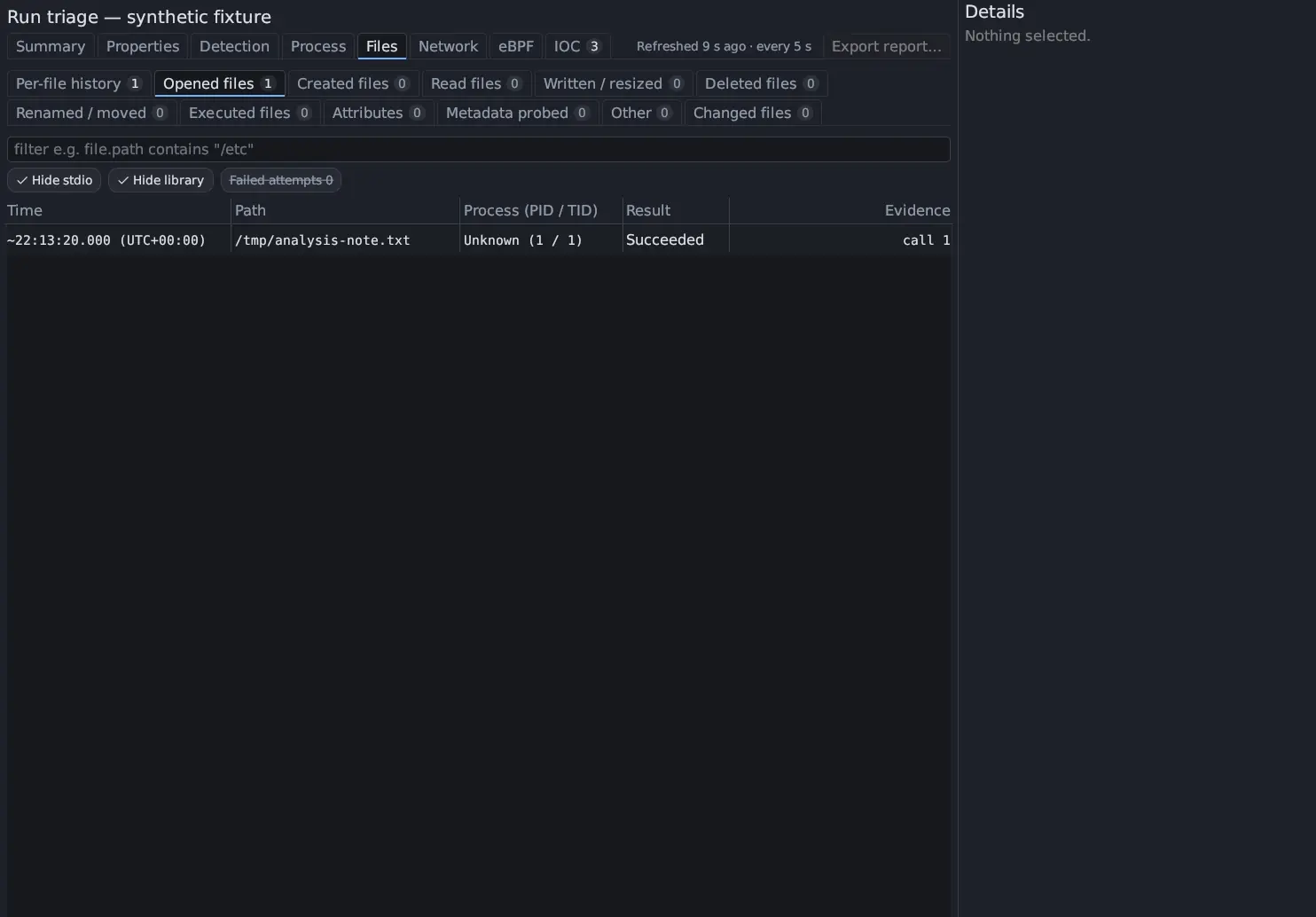
The Files section of Triage (File activity) is built from the recorded syscalls of one run. It splits file work by what the program did to a file, in twelve tabs: Per-file history first, then one tab per kind of operation and Changed files. A row is evidence that a call was made. Antinomie never infers access to the host filesystem from a guest path.
In 0.8.0 the Files section also keeps what a run wrote, finds what a changed file held before the run, and can replay a file byte by byte. That is described in File Reconstruction. To write the Files tables into a report, use Export report….
The tabs
Section titled “The tabs”Each tab has a count badge for the whole run, counted before any filter, toggle
chip or page. One call can sit in several tabs: an openat with O_CREAT that
made a new file is in Opened files and Created files, and an openat with
O_TRUNC on a file that already existed is in Opened files and Written /
resized.
| Tab | Calls that put a file there |
|---|---|
| Opened files | open, openat, openat2, creat |
| Created files | An open that created the file (see below), memfd_create, mkdir, mkdirat, mknod, mknodat |
| Read files | read, pread64, readv, preadv, preadv2, and the source of a sendfile, copy_file_range, splice or ioctl FICLONE |
| Written / resized | write, pwrite64, writev, pwritev, pwritev2 (Written); truncate, ftruncate, fallocate and an O_TRUNC open (Truncated / resized) |
| Deleted files | unlink, unlinkat, rmdir |
| Renamed / moved | rename, renameat, renameat2 |
| Executed files | execve, execveat |
| Attributes | chmod, fchmod, fchmodat, fchmodat2, chown, fchown, lchown, fchownat (Permissions & owner); utime, utimes, utimensat, futimesat (Timestamps); the setxattr and removexattr families (Extended attributes) |
| Metadata probed | stat, fstat, lstat, newfstatat, statx, access, faccessat, faccessat2, readlink, readlinkat and their 64-bit forms |
| Other | link, linkat, symlink, symlinkat (Linked); sendfile, copy_file_range, splice and ioctl FICLONE or FICLONERANGE (Copied); a file-backed mmap that is executable or shared and writable, an mprotect that adds execute, msync (Mapped); getdents, getdents64 (Directory listing); inotify_add_watch, fanotify_mark, flock and fcntl record locks (Watched / locked) |
| Changed files | One row per file the run changed; see Changed files |
Created files is certain for O_EXCL, O_TMPFILE, mkdir, mknod and
memfd_create. Any other create open is listed as Created (inferred), with
the detail path not seen earlier in this run: the only evidence that the file is
new is that no earlier call of the run used that path. Only a successful call
shows that a file was created.
A memory-backed file made by memfd_create is shown as memfd:NAME.
Per-file history
Section titled “Per-file history”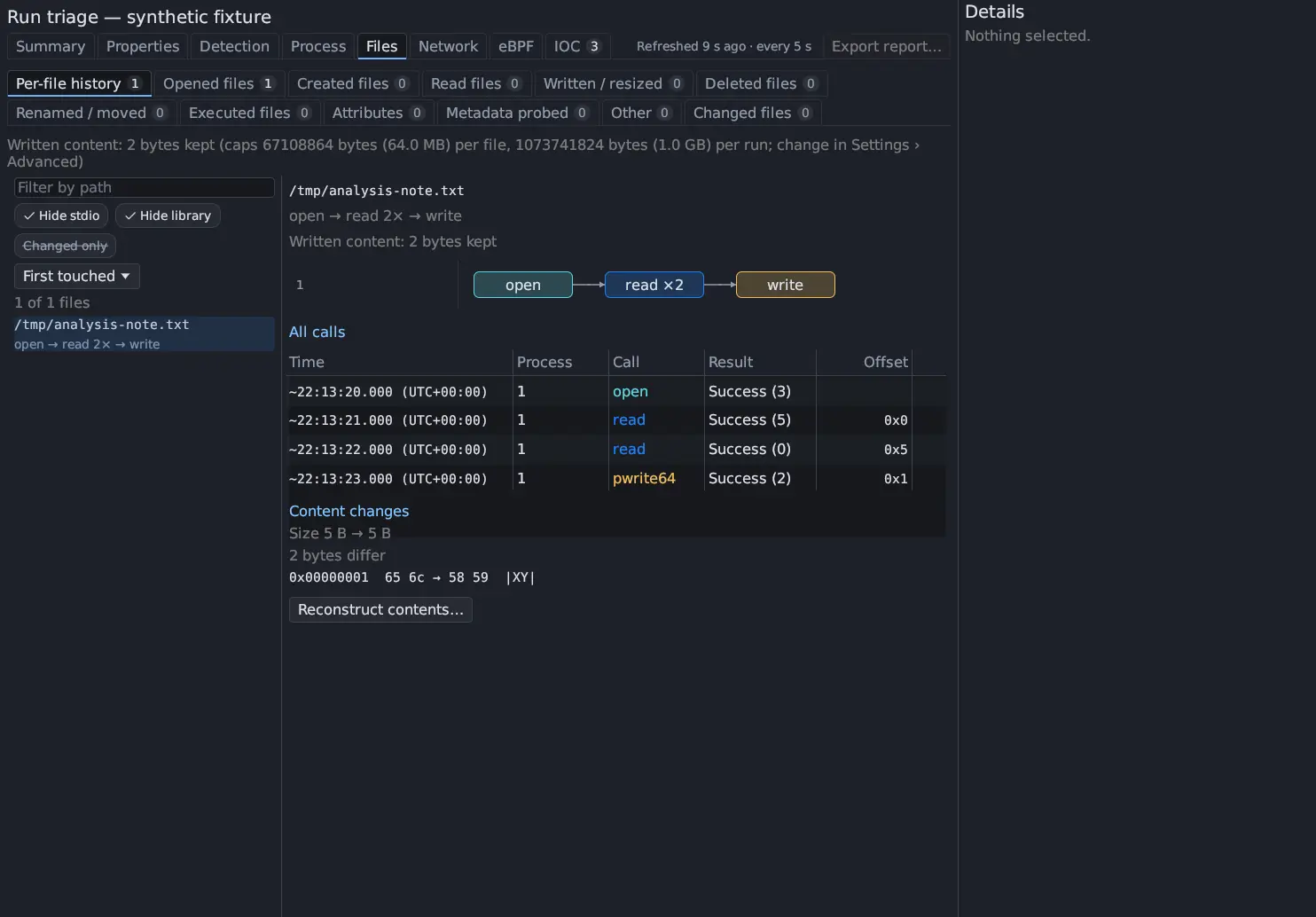
Per-file history lists every file the run touched, in the order of its first call, including files that were only opened, read or probed. Hide stdio, Hide library and Changed only narrow the list; the filter matches the path and any other name the file was given; and the list can be ordered by First touched, Last touched, Most calls or Path.
Choose a file to see its history as a graph: one box for each stretch of the
same call by the same process (open → read ×2 → write), on a lane for each
process. Click a box to list its calls (All calls shows every one): time,
process, call, result and, for reads and writes, the Offset, the Length
and the first 64 bytes the kernel captured. Click a call to see it in
Details; double-click to open it in Syscall Trace.
Content changes lists the bytes the run changed where it captured both
sides (0x00000001 65 6c → 58 59, ?? for a byte it did not capture, ∅
for one beyond the known size), the size before and after, and the guest’s
SHA-256 when it took one.
Written content and earlier bytes New in 0.8.0
Section titled “Written content and earlier bytes ”The line above the list says how much of what the run wrote is kept, and the
caps, for example Written content: 2 bytes kept (caps … per file, … per run; change in Settings › Advanced). Each file adds its own Written content: line,
the ranges that were not captured with the reason, and an Earlier bytes: line
that says what the file held when the run started. Reconstruct contents…
opens the File Reconstruction window, which
replays the file’s calls and shows what each byte is. You can also right-click a
row in any Files tab and choose Reconstruct contents….
Columns
Section titled “Columns”| Tab | Columns |
|---|---|
| Opened files | Time, Path, Process (PID / TID), Result, Evidence |
| Read files | Time, Path, Process (PID / TID), Transferred / content, Result, Evidence |
| The other operation tabs | Time, Category, Operation, Path, Detail, Process (PID / TID), Result, Location, Access, Evidence |
| Changed files | Time, Path, Process (PID / TID), Lifecycle, Diff count, Location, Evidence |
Opened and Read keep their short tables; the extra columns of a selected row (its detail, location and access) are in Details.
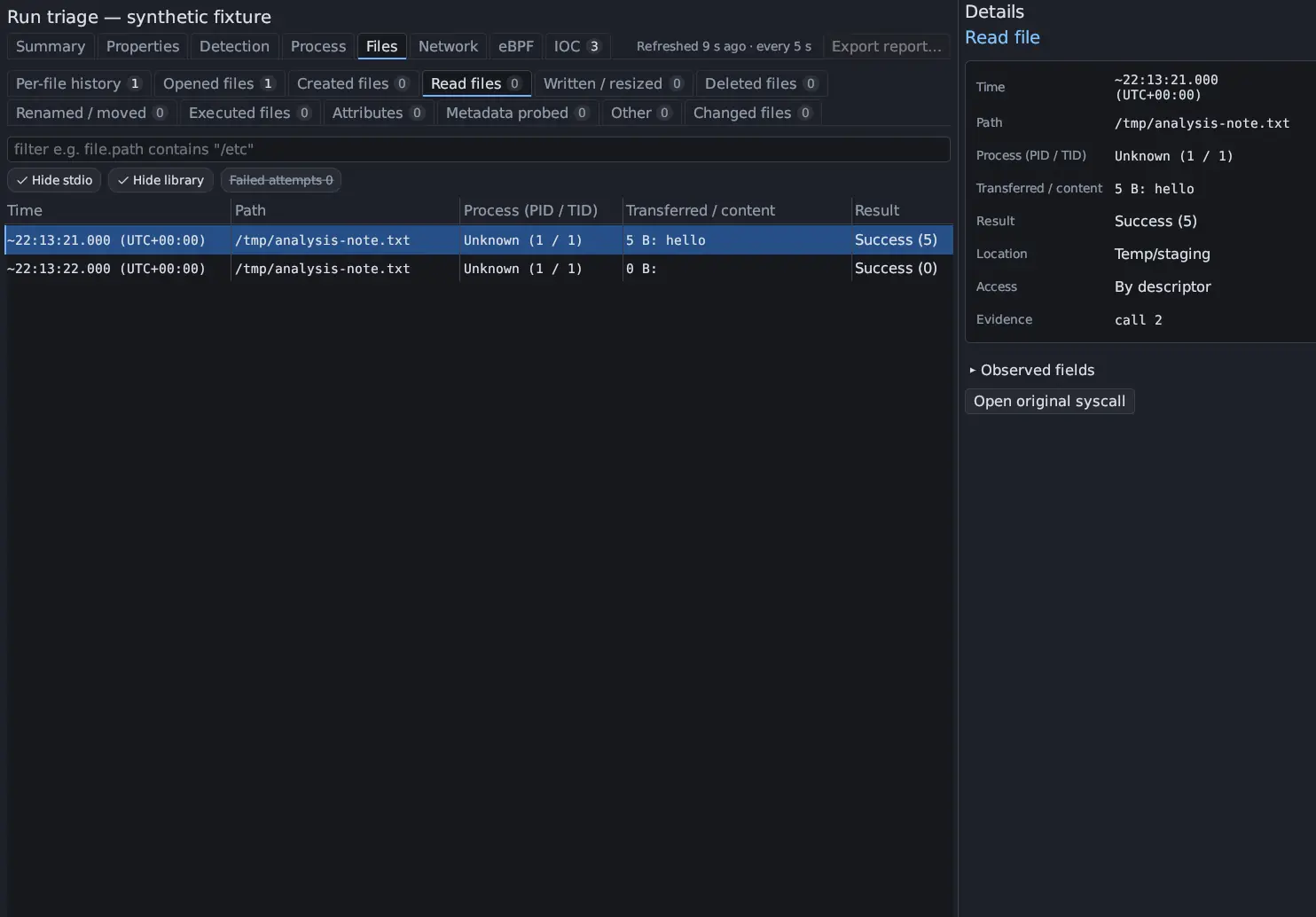
- Result reads Succeeded, Failed (ENOENT) with the error name, or No
exit when the call’s exit was not recorded. In Read files it reads
Success (N),Failed (-N)orExit unavailable. - Transferred / content shows the bytes a successful read returned and a
bounded preview of the captured content, marked
[capture gap]when part was not captured. A read made by the kernel for a copy sayskernel transfer; bytes not captured. A failed read showsUnavailable. - Detail says what the call did: the access and
O_CREAT,O_TRUNCorO_APPENDof an open,N bytes written,old → newof a rename (with(exchange)or(destination seen earlier; overwritten)), the mode of achmod(such asmode 0755 (+x)), the owner of achown,hard linkorsymbolic link,source → destinationof a copy, or the command line of an exec. Achmodthat sets setuid, setgid, sticky or execute bits is coloured as a warning. - Access is By path, By descriptor, or Inherited or unknown descriptor for a descriptor this run never saw opened.
Location classes
Section titled “Location classes”Every file row has a location class taken from its path. A path can have several. The class says where the file is, not that anything bad happened to it.
| Location | Filter value | Paths |
|---|---|---|
| Persistence | persistence |
/etc/cron*, /var/spool/cron, systemd unit directories, /etc/init.d, /etc/rc*, ~/.config/autostart, ~/.config/systemd/user, /etc/profile, /etc/profile.d, /etc/bash.bashrc, /etc/environment, shell start-up files such as .bashrc and .zshrc, /etc/ld.so.preload, authorized_keys |
| Credentials | credentials |
/etc/shadow, /etc/gshadow, /etc/passwd, /etc/sudoers, /etc/sudoers.d, .ssh, .gnupg, keyrings, .password-store |
| System binary/library | system |
/bin, /sbin, /usr/bin, /usr/sbin, /usr/local/bin, /usr/local/sbin, /lib*, /usr/lib*, /usr/local/lib |
| Temp/staging | temp |
/tmp, /dev/shm, /var/tmp |
| Pseudo-filesystem | pseudo-fs |
/proc, /sys, /dev (except /dev/shm) |
| Sample itself | self |
An image the run’s root process executed |
| Hidden | hidden |
Any path component that starts with a dot |
A row in a hidden, persistence or credentials location has a warning bar at its left edge and a warning-coloured Location, so it stands out in any tab.
Toggle chips
Section titled “Toggle chips”Three chips in the filter bar change what the tables show. None of them discards evidence or changes a count badge.
| Chip | Default | Effect |
|---|---|---|
| Hide stdio | On | Hides rows on descriptors 0, 1 and 2 (stdin, stdout, stderr), and changed files that were touched only through them |
| Hide library | On | Hides rows whose path has a component named lib, lib32, lib64 or libx32. Similar names such as /tmp/liberation.txt or /tmp/mylib/a stay. |
| Failed attempts | Off | Lists the calls the kernel refused in the change tabs and in Changed files. The chip shows how many there are. |
A failed change attempt is not a change: it is not counted in the tab badges and is hidden until you turn on Failed attempts. Opened files and Read files always list failed attempts, with their result, and count them.
io_uring and AIO requests
Section titled “io_uring and AIO requests”A program can do its file work through an io_uring ring or an AIO context, with a
few io_uring_enter or io_submit calls. Triage reads each request as the system
call it stands for, from the submission entry, the paths and data the guest
recorded and the request’s result, so the same tabs, lifecycles and detection
events cover it:
- io_uring:
IORING_OP_OPENATandOPENAT2, theREADandWRITEoperations,FTRUNCATE,FALLOCATE,CLOSE,RENAMEAT,LINKAT,SYMLINKAT,UNLINKAT,MKDIRATandSTATX; - AIO:
pread,pwrite,preadvandpwritev.
The Operation column says, for example, openat (io_uring), and the
file.via field is syscall, io_uring or AIO. The evidence of such a row is
the io_uring_enter or io_submit that carried the request. A request on a
registered descriptor is tied to its file by the file identity the guest
recorded, never by a descriptor number that means something else, and an open
straight into the ring’s registered table shows its descriptor as registered.
A vector read shows all the data it read, segment after segment. At most 100,000
requests are read per scan. A request with no completion has no result, and a
path the guest could not record stays missing.
One file across renames and hard links
Section titled “One file across renames and hard links”The guest records the device and inode of the file a call opened, renamed,
linked or removed, and of the file an io_uring request used. With that identity
Triage keeps one Changed files entry for a file that was renamed or
hard-linked, with all its names. A name that a new file takes over starts its own
entry. An unlink that leaves another link is name removed (1 link remains) in
the lifecycle, not deleted. Filter with file.inode (device:inode) and
file.names. A recording from a base built before 0.7.0 has no identities, and
files are then known by name only.
Executed scripts
Section titled “Executed scripts”When an exec runs a script, the Detail of its Executed files row names the
interpreter after the command line, for example script run through /bin/sh (loaded /bin/busybox): the interpreter exactly as the #! line names it, and
the file that was actually loaded when it is a different one, such as a symbolic
link to a multi-call binary. file.interpreter filters on the interpreter as the
#! line names it. An older base says script run through its interpreter, path not recorded.
Changed files
Section titled “Changed files”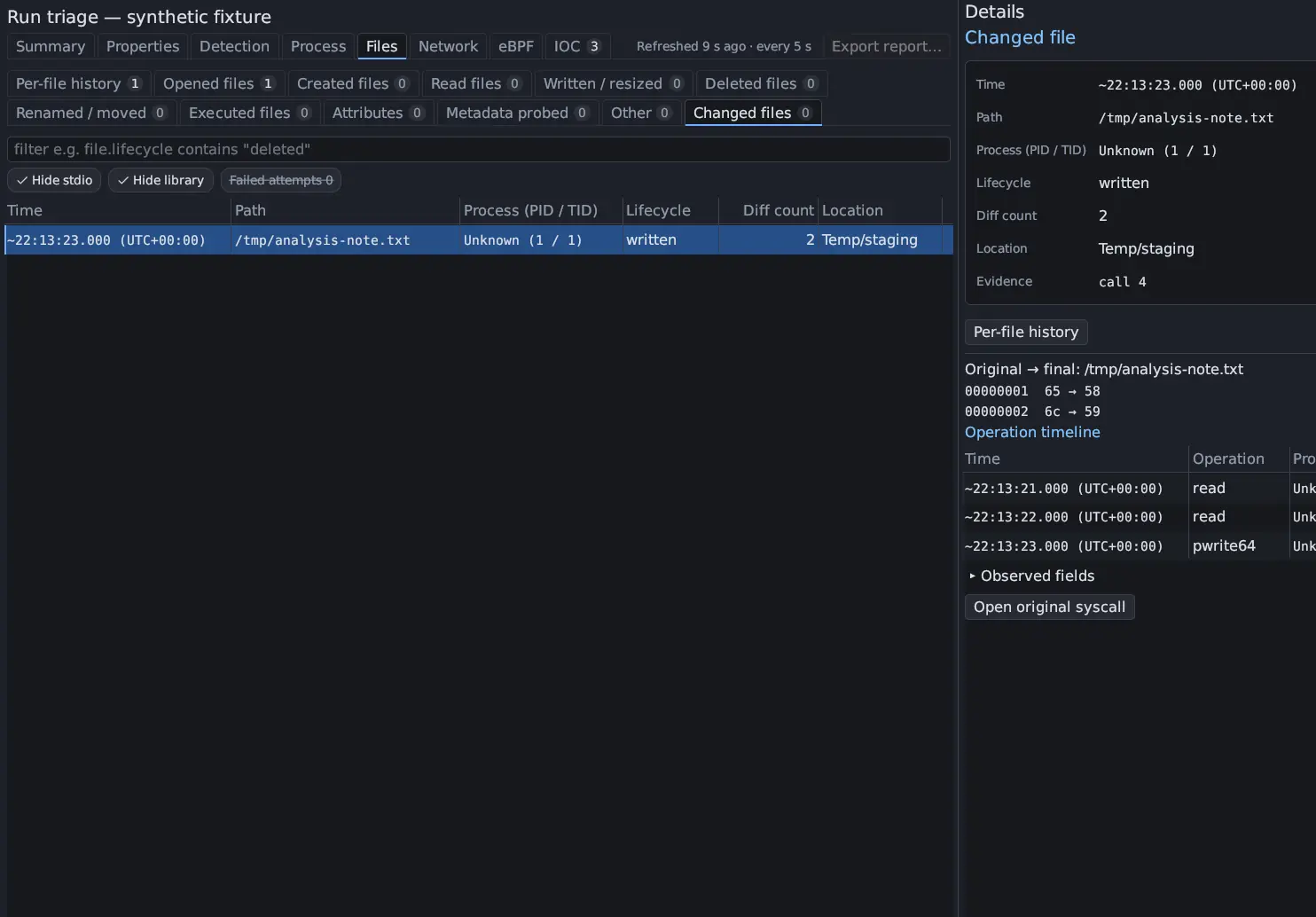
A file is changed by any of these calls, when the kernel accepted it:
| Kind | Syscalls |
|---|---|
| Writes | write, writev, pwrite64, pwritev, pwritev2 |
| Size | truncate, ftruncate, fallocate, an open with O_TRUNC |
| Creation | Any call that put the file in Created files |
| Names | unlink, unlinkat, rename, renameat, renameat2, link, linkat, symlink, symlinkat, mknod, mknodat |
| Directories | mkdir, mkdirat, rmdir |
| Permissions and owner | chmod, fchmod, fchmodat, fchmodat2, chown, fchown, lchown, fchownat |
| Attributes | setxattr, lsetxattr, fsetxattr, removexattr, lremovexattr, fremovexattr |
| Times | utime, utimes, futimesat, utimensat |
| Copies | sendfile, copy_file_range, splice, ioctl FICLONE or FICLONERANGE (the destination is the change) |
| Write-back | msync |
A memory mapping alone is not a change: mmap records a mapping, and msync is
the observed write-back of a shared mapping. A call with no recorded exit counts,
with the gap A change attempt has no recorded exit; see the operation timeline.
Lifecycle tells what happened to the file, in order, for example
created (inferred) → written 3× → chmod +x → executed → deleted. A repeated
step is counted, not repeated. Steps include created, written, truncated,
renamed → NEW, hard-linked → NAME, symlinked → NAME, chmod setuid,
chmod 0644 → 0755, chown, timestamps set, xattr changed, copied into,
executed, mapped executable, deleted and name removed (N links remain). A
name the file was reached by that no rename or link gave it is also seen as NAME. Failed attempts are added at the end, as · 2 failed attempts not counted.
Diff count is the number of known differing bytes, or N known; gaps when the
original or final contents are not fully known.
Hashes of written and deleted files
Section titled “Hashes of written and deleted files”With a base that offers it (one built for 0.7.0), the guest hashes each regular
file the run wrote when its last writer closes it, and a file just before it is
deleted. The lifecycle shows closed after write · SHA-256 4f2a9c01d3e5… or
hashed before delete · SHA-256 …, or no hash: with the reason, such as a
file over the 16 MiB limit. Details shows the full digest, labelled SHA-256 (guest, when its last writer closed it) or (guest, just before it was deleted). A digest is of the file’s bytes at hashing time.
A run that lived through a reconnect
Section titled “A run that lived through a reconnect”When the transport to the guest reconnects during a run, the run continues in a
new recording segment. Triage reads every segment of the run, oldest first, so a
file written before the reconnect and deleted after it is one story. Its
lifecycle has a reconnected step, and its operation timeline a transport reconnected · recording segment 2 line.
Details of a changed file
Section titled “Details of a changed file”Select a row to see in Details:
- Original → final with the differing bytes (
??is unavailable,∅is outside a known file extent), up to 512 differences; - a warning when the file was deleted or unlinked;
- the gaps that apply, for example the original bytes were not captured, a transfer’s offset is unknown (an inherited or shared descriptor, an append, a missing seek), a truncate or a namespace change the recording cannot fully reconstruct, a shared mapping was written, or a retention limit was reached;
- the guest’s hash, when there is one;
- the Operation timeline: every operation with its time, operation, process, result and evidence;
- Per-file history, which opens that tab on the file.
When the Disks tab shows a diff that lists the same path, Details says that this row is syscall evidence and the diff is block evidence, and offers Show in the Disks diff.
From a row to the evidence
Section titled “From a row to the evidence”Click a row to see it in Details. Double-click to open the original syscall in Syscall Trace. Right-click a row for Reconstruct contents… New in 0.8.0 and to build a filter clause. Filter the tables with Triage table filters.